
🔍 Read the full analysis: A Guide To 10 Best Graphics Cards For AI And Gaming In 2026 on ThorstenMeyerAI.com

Get business pricing on office and shipping supplies
- Business-only prices and quantity discounts
- Tax-exempt purchasing
- Multiple users, one account, clear invoices
TL;DR
A 2026 buyer’s guide from ThorstenMeyerAI.com ranks ten graphics cards, led by the GIGABYTE Radeon RX 9070 XT Gaming OC 16G as the top pick for most gaming PCs. The roundup groups cards into a high-performance tier (RX 9070 XT, RTX 5080), a measured current-generation option (RTX 5070), and legacy cards (RX 580, GT 730, GT 740) for narrow upgrade roles.
A new 2026 graphics-card buying guide published by ThorstenMeyerAI.com ranks ten current and legacy GPU options for gaming and AI-related workloads, naming the GIGABYTE Radeon RX 9070 XT Gaming OC 16G as the starting recommendation for most gaming PCs. The guide groups the field into a high-performance tier built around 16GB Radeon RX 9070 XT and GeForce RTX 5080 boards, a more restrained current-generation pick in the ASUS Prime GeForce RTX 5070, and three legacy cards — the RX 580, GT 730, and GT 740 — that the author says serve only narrow upgrade or display needs, not modern gaming.
The guide’s central argument is that buyers should match a card to the actual job: current gaming, upgrading an older PC, or simply adding display outputs. According to the author, the ranking weighted GPU generation, memory capacity, and each card’s position in its product family, along with cooler design and physical fit, because “a powerful card is a poor fit if it cannot fit the case or the system cannot support it.”
At the top of the ranking sit the RX 9070 XT and the three RTX 5080 variants, which the guide describes as the most capable classes represented, all with 16GB of graphics memory. The RTX 5070 is positioned a step below in memory capacity and overall positioning as a “more measured” current-generation route. The guide emphasizes that the two RX 9070 XT boards — the ASUS Prime and the GIGABYTE Gaming OC — share the same GPU class, so differences in cooler design, card dimensions, and system fit matter more than the brand name.
The lower tier is treated differently. The RX 580 with 8GB of memory is placed between the legacy display cards and the newer gaming GPUs, and the author says its age makes platform condition and game expectations the deciding factors. The GT 730 and GT 740 are ranked last because, despite useful features such as multiple display outputs and a low-profile format, they are not current gaming alternatives.
The guide also lays out four practical checks before buying: match the GPU to your games and display resolution, measure case fit for the specific model rather than the GPU name, confirm power-supply capacity and connectors with headroom for the rest of the system, and choose memory for the workload rather than the largest number — the roundup spans from 4GB cards to modern 16GB models.
The 10 picks
- 1
 ASUS ROG Astral GeForce RTX 5080 16GB GDDR7 White OC Edition Graphics CardView on Amazon →
 - 2
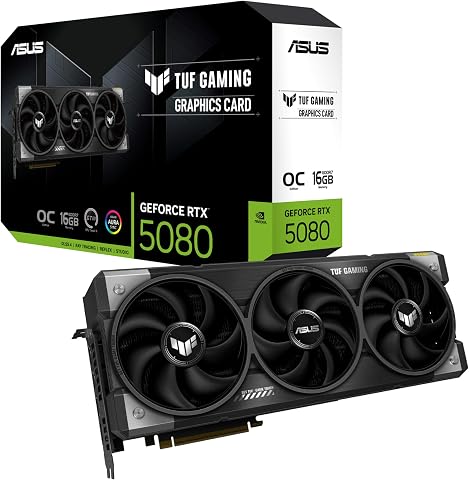 ASUS TUF Gaming GeForce RTX 5080 16GB GDDR7 OC Edition Graphics CardView on Amazon →
 - 3
 GIGABYTE GeForce RTX 5080 Gaming OC 16G Graphics CardView on Amazon →
 - 4
 ASUS Prime NVIDIA GeForce RTX 5070 OC Edition Graphics CardView on Amazon →
 - 5
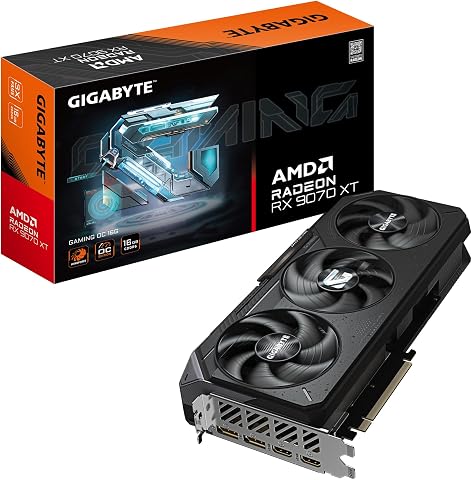 GIGABYTE Radeon RX 9070 XT Gaming OC 16G Graphics CardView on Amazon →
 - 6
 ASUS Prime Radeon RX 9070 XT 16GB GDDR6 OC Edition Gaming Graphics CardView on Amazon →
 - 7
 ASRock Radeon RX 9070 Challenger 16GB OC Graphics Card, RDNA 4, 2520MHz Boost…View on Amazon →
 - 8
 Kelinx AISURIX RX 580 8GB GDDR5 Graphics Card with Dual HDMI and DisplayPortView on Amazon →
 - 9
 GT 730 Graphics Card 4GB DDR3 64-bit with HDMI, DisplayPort, VGAView on Amazon →
 - 10
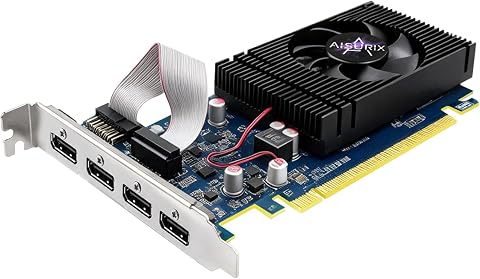 AISURIX GT 740 4GB GDDR5 Low-Profile Graphics Card with 4 HDMI PortsView on Amazon →
Why Card Matching Beats Spec Shopping
The guide’s value lies in countering a common purchase mistake: comparing model names without checking performance for the games, resolution, and settings that matter to the buyer. In a market where the same GPU ships in multiple board designs with different coolers, lengths, and slot coverage, the author’s point is that the specific model — not the GPU class — determines fit, noise, and compatibility.
The distinction also has a budget dimension. The guide warns that an otherwise compatible PC may still need a power-supply upgrade to run an RTX 5080 or RX 9070 XT, and that planning the full system cost before choosing a card can prevent a stalled build. For buyers with older machines, the message is equally direct: legacy cards like the GT 730 and GT 740 solve display problems, not performance ones, and should not be bought as gaming upgrades.
How the 2026 GPU Field Is Shaped
The 2026 lineup reflects a market split between current-generation 16GB GPUs — the Radeon RX 9070 XT and GeForce RTX 5080 families — and much older hardware that remains on shelves for specialized roles. The RTX 5070 occupies the middle ground as a current-generation card with less memory, while the RX 580, GT 730, and GT 740 date from earlier GPU generations and persist because of low prices, compact formats, or multi-display output support.
The three RTX 5080 options in the roundup are premium variants of the same GPU, and the guide advises comparing their coolers and physical fit rather than treating them as different performance classes. The ROG Astral White variant is called out specifically for its emphasis on build appearance rather than capability.
“For most gaming PCs, I’d start with the GIGABYTE Radeon RX 9070 XT Gaming OC 16G, which pairs a current-generation GPU with 16GB of memory.”
— ThorstenMeyerAI.com graphics-card guide
What the Guide Leaves Open
The source material does not include benchmark numbers, pricing, or availability for any of the ten cards, so the ranking reflects the author’s framework rather than test results published in the excerpt. Performance claims about game-readiness for each tier are the author’s assessment and should be verified against independent reviews for specific titles and resolutions.
The guide also does not specify which two RTX 5080 variants accompany the ROG Astral White beyond describing them as premium versions of the same GPU, and it does not detail AI-workload performance despite the 2026 AI framing — its memory guidance for creative applications points readers to each software package’s own hardware recommendations instead. Availability and street pricing for current-generation GPUs can also shift quickly, and the guide does not state whether prices were checked at publication.
Before You Order a Card
Buyers following the guide’s method should next measure their case clearance for the specific board model, verify their power supply’s wattage and connectors against the manufacturer’s recommendation, and check independent benchmarks for their target games and resolution. The author advises leaving power headroom for the processor and rest of the system, and avoiding improvised adapters without checking card and power-supply guidance.
For those planning a future display upgrade, the guide suggests choosing a card that matches the next monitor — provided the rest of the PC can keep up. Updated pricing, restocks, and new GPU releases through 2026 may shift the value of these picks, so comparisons should be revisited at purchase time.
Key Questions
Which graphics card does the guide recommend for most gaming PCs?
The GIGABYTE Radeon RX 9070 XT Gaming OC 16G, which the author says pairs a current-generation GPU with 16GB of memory, is the starting recommendation for most builds.
Are the GT 730 and GT 740 good for gaming in 2026?
No. According to the guide, these cards serve display-output and compact-PC needs; their multiple outputs or low-profile formats do not make them current gaming alternatives.
What is the difference between the two RX 9070 XT cards listed?
They use the same GPU class. The meaningful differences are cooler design, card dimensions, and how each fits a given system — the brand name alone does not distinguish them.
Does more graphics memory mean better performance?
Not by itself. The guide states that more memory alone does not make an older GPU fast, and recommends choosing memory capacity based on workload, resolution, and tested performance in your games.
What should I check before buying a high-end card like an RTX 5080?
Verify case clearance for the exact model, your power supply’s wattage and connectors with headroom for the whole system, and the manufacturer’s recommended supply — an otherwise compatible PC may still need a PSU upgrade.
Source: ThorstenMeyerAI.com
Fall Picks
fall essentials
As an affiliate, we earn on qualifying purchases.