For most Mac business users, the Plugable TBT-UDM is my best overall pick: it pairs Thunderbolt 4 with 100W charging for a practical single-cable desk setup. The CalDigit TS4 stands out when a desk needs many connections, while the Anker Prime TB5 suits teams planning for newer Thunderbolt 5 equipment. Choosing between these docks means balancing display support, power delivery, port mix, and how much room a dock takes on a desk. Mac display limits can vary by model, so compatibility matters as much as the dock’s headline monitor count. Read on for the full breakdown and guidance on matching a dock to your work setup.

Get office and shipping supplies delivered free — and shop member deals
- Fast, free delivery on millions of items
- Access to Prime Big Deal Days deals on October 6–7
- Prime Video, Amazon Music and more included
Key Takeaways
- The Plugable TBT-UDM leads for a typical Mac business desk because its Thunderbolt 4 connection and 100W charging cover the core one-cable workflow without requiring a Thunderbolt 5 laptop.
- The CalDigit TS4’s 18-port layout favors users connecting varied peripherals, while the smaller UGREEN 8-in-1 is a better fit when desk space and a shorter port list matter more.
- Thunderbolt 5 docks such as the Anker Prime TB5, Sonnet Echo 21, and iVANKY FusionDock Max 2 target newer, demanding setups; their advantages depend on having compatible Mac hardware and workloads that use the added bandwidth.
- The Sonnet Echo 21 is unusually suited to business users who need 10GbE or an internal NVMe SSD slot, but those specialized connections are unnecessary for many office desks.
- Display claims need a Mac-specific check: the StarTech listing distinguishes quad 4K support on Windows from dual 4K on Mac, and a dock cannot remove a Mac’s own external display limit.
| Anker Prime TB5 Docking Station, 14-in-1 Thunderbolt 5 Dock for Laptops |  | Best for Thunderbolt 5 Headroom | Ports: 14-in-1 | Thunderbolt: Thunderbolt 5 upstream; 2 Thunderbolt 5 downstream | Laptop charging: Up to 140W PD 3.1 | VIEW ON AMAZON | See Our Full Breakdown |
| Plugable TBT-UDM Thunderbolt 4 Dock for MacBook, 100W Charging |  | Best for a Straightforward Dual-Display Desk | Connectivity: Thunderbolt 4 | Total ports: 13 | USB ports: 7 | VIEW ON AMAZON | See Our Full Breakdown |
| Belkin Thunderbolt 4 Docking Station, Triple 4K Display, 14-in-1 USB-C Hub, 96W Power Delivery |  | Best for a Three-Monitor Mac Workstation | Ports: 14-in-1 | Video support: Up to 3 extended monitors at 4K and 60Hz | Data transfer: Up to 40Gbps | VIEW ON AMAZON | See Our Full Breakdown |
| UGREEN 8-in-1 Thunderbolt 4 Docking Station |  | Best for a Compact Thunderbolt Expansion Setup | Ports: 8-in-1: 3 Thunderbolt 4, 3 USB-A 3.2, Gigabit Ethernet, 140W DC power | Thunderbolt speed: Up to 40Gbps | USB-A speed: Up to 10Gbps | VIEW ON AMAZON | See Our Full Breakdown |
| Plugable 16-in-1 Thunderbolt 4 Dock with Dual 4K Monitor Support and 100W Charging |  | Best Value for a Fully Equipped Office Desk | Total ports: 16 | USB ports: 7 | Maximum displays: Dual 4K at 60Hz | VIEW ON AMAZON | See Our Full Breakdown |
| CalDigit TS4 18-Port Thunderbolt 4 Dock, Space Gray | 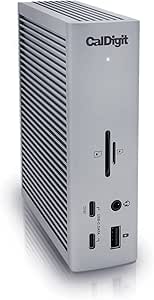 | Best Overall for Mac Business Workstations | Total ports: 18 | Thunderbolt ports: 3x Thunderbolt 4, 40Gb/s | USB ports: 8, up to 10Gb/s | VIEW ON AMAZON | See Our Full Breakdown |
| Anker Prime 14-in-1 Docking Station with Dual HDMI Displays |  | Best for Straightforward Peripheral Charging | Connectivity: 14-in-1 | Total power output: 160W | USB-C ports: 3, up to 100W max each | VIEW ON AMAZON | See Our Full Breakdown |
| Sonnet Echo 21 Thunderbolt 5 SuperDock with 10GbE, NVMe SSD Slot, HDMI, DisplayPort, 140W USB-C PD |  | Best Premium Dock for High-Bandwidth Workflows | Interface: Thunderbolt 5 | Total ports: 21 | USB ports: 12: three Thunderbolt 5 and nine 10Gbps USB-A/USB-C | VIEW ON AMAZON | See Our Full Breakdown |
| iVANKY FusionDock Max 2 23-in-1 Intel Certified Thunderbolt 5 Docking Station |  | Best for MacBook Multi-Display Setups | Total connectivity: 23-in-1 | Thunderbolt ports: 3 Thunderbolt 5 downstream ports, up to 120Gbps data transfer | USB ports: 10, up to 10Gbps | VIEW ON AMAZON | See Our Full Breakdown |
| StarTech Thunderbolt 4 Docking Station – 16-Port, 40Gbps, Quad 4K (Windows), Dual 4K (Mac), 100W |  | Best Cross-Platform Business Dock | Total ports: 16 | Interface and data rate: Thunderbolt 4/USB4, up to 40Gbps | Laptop power delivery: 98W | VIEW ON AMAZON | See Our Full Breakdown |
| thunderbolt docks for mac business user | Display support | Ethernet | Compatibility | Total ports |
|---|---|---|---|---|
| Anker Prime TB5 Docking Statio | Up to dual 8K at 60Hz on Thunderbolt 5 Windows laptops | 2.5Gbps | — | — |
| Plugable TBT-UDM Thunderbolt 4 | Up to dual 4K at 60Hz on compatible systems | — | — | 13 |
| Belkin Thunderbolt 4 Docking S | — | 2.5Gb | — | — |
| UGREEN 8-in-1 Thunderbolt 4 Do | Up to dual 4K at 60Hz or single 8K at 30Hz on compatible devices | — | Thunderbolt 4, Thunderbolt 3, USB4, or USB-C computers and tablets | — |
| Plugable 16-in-1 Thunderbolt 4 | — | 2.5Gbps | — | 16 |
| CalDigit TS4 18-Port Thunderbo | Single 8K or dual 6K, depending on OS and host hardware | 2.5GbE | Thunderbolt 4/3, USB4, and USB-C Macs, Windows PCs, and Chrome OS devices | 18 |
| Anker Prime 14-in-1 Docking St | Up to 2K at 60Hz with DP 1.4; up to 1080p at 60Hz with DP 1.2 | — | USB-C, USB4, Thunderbolt, Windows 10 and 11, and ChromeOS; requires DP Alt Mode and Power Delivery | — |
| Sonnet Echo 21 Thunderbolt 5 S | Up to two 8K or three to four 4K/5K/6K displays, depending on host | 10GbE | Mac, Windows, Chromebook, and iPad Pro with Thunderbolt/USB4 | 21 |
| iVANKY FusionDock Max 2 23-in- | On M1–M4 Max: dual 6K at 60Hz plus single 4K at 60Hz; capabilities vary by chip | 2.5Gbps RJ45 | MacBook series (2020 and later), M1–M5 Pro/Max; macOS 10.15 Catalina or later | — |
| StarTech Thunderbolt 4 Docking | Quad 4K at 60Hz on compatible Windows systems; dual extended 4K at 60Hz on Mac | — | Windows, macOS, Intel, Apple Silicon M1–M4, AMD, and Snapdragon X Copilot+ PCs | 16 |
More Details on Our Top Picks
Anker Prime TB5 Docking Station, 14-in-1 Thunderbolt 5 Dock for Laptops
For a Mac business user already working with large media or project files, the Anker Prime TB5’s Thunderbolt 5 bandwidth and 140W charging leave more room for fast storage and power-hungry laptops than the Thunderbolt 4 docks here. Its 14-port selection includes 2.5Gb Ethernet, card readers, and two downstream Thunderbolt 5 ports, which can reduce desk clutter for teams moving between peripherals and high-speed drives. The tradeoff is that its headline dual 8K support applies to Thunderbolt 5 Windows laptops; Mac display support depends on the specific host. Compared with the Plugable TBT-UDM, this is the more forward-looking choice, but that extra capacity may not help a MacBook workflow that only needs dual 4K screens. Active cooling also adds a component to a dock built for heavier loads.
Pros:- Thunderbolt 5 upstream and two downstream ports support high-bandwidth peripherals
- Up to 140W PD 3.1 charging
- Includes 2.5Gb Ethernet and SD/TF card readers
- Active cooling is designed for sustained heavy use
Cons:- Dual 8K display support is specified for Thunderbolt 5 Windows laptops, not Macs
- Its expanded bandwidth and charging may be unnecessary for typical office setups
Best for: Mac business users with Thunderbolt 5 Macs, fast external storage, and demanding peripheral setups who want higher charging capacity.
Not ideal for: MacBook users who only need basic dual-display office connectivity and would not use Thunderbolt 5 bandwidth or the extra ports.
- Ports:14-in-1
- Thunderbolt:Thunderbolt 5 upstream; 2 Thunderbolt 5 downstream
- Laptop charging:Up to 140W PD 3.1
- Ethernet:2.5Gbps
- Video outputs:HDMI 2.1 or DisplayPort 2.1
- Display support:Up to dual 8K at 60Hz on Thunderbolt 5 Windows laptops
- Cooling:Active cooling system
- Included cables:3.3 ft Thunderbolt 5 cable and 6 ft AC power cable
Our verdict“Choose the Anker Prime TB5 if your Mac workflow can use Thunderbolt 5 bandwidth and 140W charging; otherwise, a Thunderbolt 4 dock may fit better.”
Plugable TBT-UDM Thunderbolt 4 Dock for MacBook, 100W Charging
The Plugable TBT-UDM makes sense for a Mac office setup built around two HDMI monitors and a single cable for charging and accessories. Its 13 ports include SD and microSD readers, Ethernet, audio, and 100W host charging, so a laptop can connect to common desk gear without a separate hub. Compared with the 16-port Plugable Thunderbolt 4 dock, the TBT-UDM gives up some port capacity and 2.5Gbps Ethernet, but keeps a clear dual-HDMI focus. Mac display support is the key qualification: compatible Macs may need clamshell mode, and base M1 and M2 MacBooks support only one external display. That makes this less suitable for a mixed fleet where every laptop needs the same extended desktop. Its 1.3 kg weight also favors a permanent desk over frequent travel.
Pros:- Two HDMI outputs support up to dual 4K at 60Hz on compatible systems
- 100W host charging
- 13-port setup includes SD and microSD readers, Ethernet, and audio
- Lifetime support from a North American team
Cons:- Mac display support varies by model, and some setups require clamshell mode
- Base M1 and M2 MacBooks support only one external display
- Gigabit Ethernet is less capable than the 2.5Gbps connection on Plugable’s 16-in-1 dock
Best for: MacBook users with a compatible Thunderbolt or USB4 Mac who want two HDMI displays, 100W charging, and lifetime support.
Not ideal for: Users with base M1 or M2 MacBooks who need two external displays, or teams that need 2.5Gb Ethernet.
- Connectivity:Thunderbolt 4
- Total ports:13
- USB ports:7
- HDMI outputs:2
- Display support:Up to dual 4K at 60Hz on compatible systems
- Host charging:100W
- Downstream Thunderbolt:1 Thunderbolt 4 port, up to 40Gbps
- Dimensions and weight:3.3 x 8.9 x 0.9 in; 1.3 kg
Our verdict“Pick the TBT-UDM for a compatible MacBook desk centered on two HDMI monitors and familiar office connections.”
Belkin Thunderbolt 4 Docking Station, Triple 4K Display, 14-in-1 USB-C Hub, 96W Power Delivery
When a business desk needs three extended 4K screens, the Belkin Connect Thunderbolt 4 dock offers a more display-focused setup than the Plugable TBT-UDM, which supports up to two 4K HDMI displays. Its 14-port layout, 96W charging, and 2.5Gb Ethernet also suit a fixed workstation that moves data across a wired office network while powering a laptop. The stated three-display capability still depends on the host, so Mac buyers should check their model’s external display limits before choosing it. Compared with the 16-port Plugable dock, Belkin emphasizes a third monitor and adds a Kensington lock slot, while giving up two ports and a little charging capacity. Its security features and three-year coverage may appeal to managed desks, but the extra display capacity offers little value if your Mac only drives two screens.
Pros:- Supports up to three extended 4K displays at 60Hz on capable hosts
- 96W power delivery for laptop charging
- 2.5Gb Ethernet and 40Gbps Thunderbolt 4 data transfer
- Kensington lock slot and three-year coverage up to $2,500
Cons:- Triple-display support depends on the host computer’s capabilities
- 96W charging is lower than the 100W offered by both Plugable docks here
- Its multi-monitor capacity may go unused on Macs limited to fewer displays
Best for: Mac business users with a host that supports three external displays and a fixed workstation built around multiple 4K monitors.
Not ideal for: Owners of Macs limited to one or two external displays, or laptop users who want a more compact travel dock.
- Ports:14-in-1
- Video support:Up to 3 extended monitors at 4K and 60Hz
- Data transfer:Up to 40Gbps
- Power delivery:96W
- Ethernet:2.5Gb
- Security:Kensington lock slot and 6-point safety system
- Coverage:3 years, coverage up to $2,500
Our verdict“Choose the Belkin if your Mac supports three external displays and your desk benefits from wired networking and physical dock security.”
UGREEN 8-in-1 Thunderbolt 4 Docking Station
The UGREEN 8-in-1 keeps the connection mix simple: three Thunderbolt 4 ports, three USB-A ports, and Gigabit Ethernet, with an included 140W GaN charger that can deliver up to 85W to the laptop. That makes it a fit for Mac users who want to attach fast peripherals and charge from one desk dock without the larger port assortment of the Belkin or Plugable 16-in-1. It supports up to dual 4K at 60Hz or a single 8K display on compatible systems, though display limits vary across Macs and processors. Compared with the Anker Prime TB5, it has fewer ports and older Thunderbolt bandwidth, but it also avoids selling an 8K dual-display promise that is specifically tied to TB5 Windows laptops. The 8-port count can feel restrictive if a desk relies on card readers or 2.5Gb Ethernet, neither of which is listed.
Pros:- Three Thunderbolt 4 ports provide expansion for high-speed peripherals
- Includes a 140W GaN charger and supports up to 85W laptop charging
- Three USB-A ports support legacy office accessories
- Supports up to dual 4K at 60Hz on compatible computers
Cons:- Display output varies by computer and processor, with limits on some M-series Macs
- Requires the included charger to operate
- No card readers or 2.5Gb Ethernet are listed
Best for: Mac professionals who need several Thunderbolt connections, a few USB-A ports, and bundled laptop charging at a fixed desk.
Not ideal for: Users who need SD or microSD readers, 2.5Gb Ethernet, or guaranteed dual-display support on a basic M-series MacBook.
- Ports:8-in-1: 3 Thunderbolt 4, 3 USB-A 3.2, Gigabit Ethernet, 140W DC power
- Thunderbolt speed:Up to 40Gbps
- USB-A speed:Up to 10Gbps
- Display support:Up to dual 4K at 60Hz or single 8K at 30Hz on compatible devices
- Laptop charging:Up to 85W
- Included charger:140W GaN
- Compatibility:Thunderbolt 4, Thunderbolt 3, USB4, or USB-C computers and tablets
- Operating systems:macOS 11.4 or later; Windows 10 or later
Our verdict“Choose the UGREEN if your Mac desk needs multiple Thunderbolt connections and charging, but not a full set of network and card-reader options.”
Plugable 16-in-1 Thunderbolt 4 Dock with Dual 4K Monitor Support and 100W Charging
The 16-in-1 Plugable is the broadest office-focused fit here for a Mac user who wants dual 4K displays plus plenty of everyday connections. Its seven USB ports, 2.5Gbps Ethernet, card readers, and 100W charging reduce the need to add separate adapters, while plug-and-play operation avoids installing display drivers. Compared with the TBT-UDM, it adds three ports and faster Ethernet; compared with the Belkin, it gives up the option of a third 4K screen but has more listed ports and slightly higher charging output. That trade suits most two-monitor office desks, though Mac display support still depends on the host model. Its Thunderbolt 4 cable provides 40Gbps when paired with a compatible host, while USB-C systems may not reach that bandwidth. The dock’s breadth is most useful at a permanent workstation.
Pros:- Supports dual 4K displays at 60Hz through HDMI or DisplayPort
- Seven USB ports, SD and microSD slots, and 2.5Gbps Ethernet
- 100W Power Delivery charging tested to UL standards
- Compatible with Thunderbolt 5 and 4, USB4, and USB-C systems
Cons:- Full 40Gbps bandwidth requires a Thunderbolt 4 host
- Dual-display support depends on the Mac model and its display capabilities
Best for: Mac business users with a compatible host who run two 4K monitors and connect several USB devices, wired networking, and memory cards.
Not ideal for: Users whose Mac needs three external displays, or those with a USB-C-only laptop who expect full Thunderbolt 40Gbps bandwidth.
- Total ports:16
- USB ports:7
- Maximum displays:Dual 4K at 60Hz
- Video outputs:HDMI and DisplayPort
- Power delivery:100W
- Ethernet:2.5Gbps
- Card slots:SD and microSD
- Included cable:Thunderbolt 4, 40Gbps, 3.3 ft
Our verdict“Choose the 16-in-1 Plugable for a compatible Mac two-monitor desk that needs many ports and fast wired networking in one dock.”
CalDigit TS4 18-Port Thunderbolt 4 Dock, Space Gray
The CalDigit TS4 is the strongest all-around fit here for a Mac office that needs one dock to handle displays, wired networking, storage, and peripherals. Its 18 ports, 2.5GbE Ethernet, and 98W charging make it better suited to a busy desk than the Anker Prime 14-in-1, whose dual HDMI outputs mirror on macOS. The TS4 can support a single 8K or dual 6K display, though the Mac’s chip and host connection affect what you can actually run. That flexibility comes with a practical tradeoff: many ports are useful only if the laptop has Thunderbolt 4 or full USB4, and non-Pro M1–M3 Macs remain limited to one external display. I’d choose it for a mixed set of demanding desk tasks, not for display expansion alone.
Pros:- 18 ports cover a wide range of desk peripherals
- 98W charging can power a large-screen laptop over one cable
- 2.5GbE and UHS-II SD and microSD readers suit network-heavy and media workflows
- Supports up to a single 8K or dual 6K displays, subject to host capability
Cons:- Base M1–M3 Macs are limited to one external display
- Full performance depends on a Thunderbolt 4 or full USB4 host connection
- The supplied certified Thunderbolt cable is needed for proper operation
Best for: Mac professionals who need fast wired networking, multiple peripheral connections, and high-wattage charging at one permanent workstation
Not ideal for: Owners of base M1–M3 Macs who need several extended displays, or laptop users whose USB-C port lacks Thunderbolt 4 or full USB4
- Total ports:18
- Thunderbolt ports:3x Thunderbolt 4, 40Gb/s
- USB ports:8, up to 10Gb/s
- Laptop charging:98W
- Ethernet:2.5GbE
- Display support:Single 8K or dual 6K, depending on OS and host hardware
- Card readers:UHS-II SD and microSD
- Compatibility:Thunderbolt 4/3, USB4, and USB-C Macs, Windows PCs, and Chrome OS devices
Our verdict“Choose the TS4 for a demanding Mac desk that needs broad connectivity and 2.5GbE in one dock, provided its display limits match your Mac.”
Anker Prime 14-in-1 Docking Station with Dual HDMI Displays
The Anker Prime 14-in-1 suits an office where charging several accessories and connecting common USB devices matter more than extending a Mac across two monitors. It offers 160W total output, three USB-C ports rated up to 100W each, and data speeds up to 10Gbps. That makes it more charging-focused than the CalDigit TS4, which adds 2.5GbE and Thunderbolt 4 ports for higher-end desk setups. The Anker’s two HDMI ports may sound like a dual-screen Mac solution, but macOS mirrors the external displays; Windows display support also depends on the laptop’s DP Alt Mode and version. The dock does not support Linux or 5120×1440 monitors. I’d pick it for a simpler USB-C office setup, but skip it if separate extended Mac displays are a requirement.
Pros:- Three USB-C ports support up to 100W each
- 160W total output can charge multiple connected devices
- Up to 10Gbps data transfer for compatible peripherals
- Includes two HDMI outputs for compatible non-mirrored display setups
Cons:- macOS mirrors the two external displays
- Does not support Linux
- Does not support 5120×1440 monitors
Best for: Mac office users who want a straightforward hub for charging several devices and connecting everyday peripherals
Not ideal for: Mac users who need two independently extended external displays, Linux users, or teams using 5120×1440 monitors
- Connectivity:14-in-1
- Total power output:160W
- USB-C ports:3, up to 100W max each
- USB-A ports:1, up to 12W
- Data transfer:Up to 10Gbps
- Display outputs:2 HDMI ports
- Display support:Up to 2K at 60Hz with DP 1.4; up to 1080p at 60Hz with DP 1.2
- Compatibility:USB-C, USB4, Thunderbolt, Windows 10 and 11, and ChromeOS; requires DP Alt Mode and Power Delivery
Our verdict“Pick the Anker Prime for USB-C accessory charging and routine connections, but choose the CalDigit TS4 if your Mac desk needs faster wired networking or extended displays.”
Sonnet Echo 21 Thunderbolt 5 SuperDock with 10GbE, NVMe SSD Slot, HDMI, DisplayPort, 140W USB-C PD
The Sonnet Echo 21 SuperDock is the premium choice for Mac teams moving large files across fast storage and wired networks. Thunderbolt 5 bandwidth, 10GbE, and an internal M.2 NVMe slot give it a different job from the CalDigit TS4: it can add local SSD storage inside the dock while serving high-throughput peripherals. Its 140W charging and 21 interfaces also help consolidate a crowded workstation. Display support is broad, reaching up to two 8K or three to four 4K/5K/6K displays, but actual results depend on the host. The M.2 drive is user-installed, so the slot does not provide storage by itself. Compared with the iVANKY FusionDock Max 2, the Sonnet is less Mac-exclusive and offers 10GbE; its Thunderbolt 5 capabilities make most sense when the connected devices and laptop can use them.
Pros:- Thunderbolt 5 provides up to 80Gbps data and 120Gbps video bandwidth
- 10GbE supports high-speed wired network workflows
- Internal M.2 NVMe slot accepts user-installed storage up to 8TB
- 140W power delivery and 21 interfaces help consolidate a workstation
Cons:- The M.2 NVMe drive is not included
- Its advanced bandwidth and networking may go unused on basic office setups
- Display configurations depend on the host computer
Best for: Mac video, design, and engineering teams that move large files, need 10GbE, and want user-installed NVMe storage at the desk
Not ideal for: Mac users with mostly basic peripherals, no Thunderbolt 5 workflow, or no need for 10GbE and internal SSD expansion
- Interface:Thunderbolt 5
- Total ports:21
- USB ports:12: three Thunderbolt 5 and nine 10Gbps USB-A/USB-C
- Ethernet:10GbE
- Storage:Internal M.2 NVMe slot, supports up to 8TB user-installed SSD
- Bandwidth:Up to 80Gbps data and 120Gbps video
- Power delivery:Up to 140W
- Display support:Up to two 8K or three to four 4K/5K/6K displays, depending on host
- Compatibility:Mac, Windows, Chromebook, and iPad Pro with Thunderbolt/USB4
Our verdict“Choose the Sonnet for a high-bandwidth Mac workstation that can use 10GbE and added NVMe storage; for a more conventional desk, the CalDigit TS4 covers core docking needs with less specialized hardware.”
iVANKY FusionDock Max 2 23-in-1 Intel Certified Thunderbolt 5 Docking Station
The iVANKY FusionDock Max 2 is aimed squarely at MacBook users who want a large number of connections and high-resolution extended displays from one dock. Its three Thunderbolt 5 ports, 10 USB ports, and 140W power delivery make it a fuller Mac desk hub than the Anker Prime, whose two HDMI outputs mirror on macOS. The advertised triple-display setup depends on the Apple chip: the supplied details specify dual 6K at 60Hz plus one 4K at 60Hz on M1–M4 Max chips, while base M1–M3 Macs may support only one external display. Its fanless aluminum chassis avoids fan noise, though it can get warm under sustained load. This is a focused MacBook choice, not a shared dock for a mixed Windows and Mac office, and it cannot switch between multiple computers.
Pros:- 23-in-1 connectivity includes three Thunderbolt 5 ports and 10 USB ports
- Supports high-resolution multi-display configurations on compatible Macs
- Fanless passive cooling avoids dock fan noise
- 140W power delivery and a 24-month warranty
Cons:- Mac-only compatibility prevents use with Windows or Chrome laptops
- Display capability varies substantially by Apple chip
- Supports one Mac at a time and cannot switch between multiple computers
- Chassis can become warm under sustained load
Best for: MacBook Pro teams with compatible Pro or Max chips that need several extended high-resolution displays and many connected peripherals
Not ideal for: Mixed-platform offices, owners of base Apple Silicon Macs expecting triple displays, or users who need one dock shared between computers
- Total connectivity:23-in-1
- Thunderbolt ports:3 Thunderbolt 5 downstream ports, up to 120Gbps data transfer
- USB ports:10, up to 10Gbps
- Power delivery:140W
- Display support:On M1–M4 Max: dual 6K at 60Hz plus single 4K at 60Hz; capabilities vary by chip
- Ethernet:2.5Gbps RJ45
- Card reader:SD/TF 4.0, up to 312MB/s
- Cooling and enclosure:Fanless passive cooling; full-aluminum chassis
- Compatibility:MacBook series (2020 and later), M1–M5 Pro/Max; macOS 10.15 Catalina or later
Our verdict“Choose the FusionDock Max 2 for a compatible MacBook Pro display-heavy desk; choose the Sonnet Echo 21 if your office also needs 10GbE or cross-platform compatibility.”
StarTech Thunderbolt 4 Docking Station – 16-Port, 40Gbps, Quad 4K (Windows), Dual 4K (Mac), 100W
The StarTech 16-port Thunderbolt 4 dock is a sensible fit for a business that equips both Macs and Windows PCs and wants a consistent, driverless desk setup. It supports dual extended 4K displays on Mac and up to quad 4K on compatible Windows systems, with 98W laptop charging. That cross-platform reach sets it apart from the Mac-only iVANKY FusionDock Max 2. Display counts still depend on the computer: quad 4K on Windows requires Intel 12th Gen or later with DP 1.4 DSC, while some Mac configurations have their own limits, including clamshell mode for M3. Compared with the CalDigit TS4, the StarTech provides a broad stated compatibility range but less detailed port-level information in the supplied specs. I’d favor it for managed mixed fleets, after checking each laptop’s display support.
Pros:- Driverless compatibility spans macOS, Windows, Intel, Apple Silicon, AMD, and Snapdragon X PCs
- Supports dual extended 4K displays on Mac
- Can support quad 4K at 60Hz on compatible Windows systems
- 98W charging powers the laptop through the dock
Cons:- Quad 4K on Windows requires Intel 12th Gen or later with DP 1.4 DSC
- Dual extended displays on M1/M2 MacBook Pro require a Pro or Max chip
- M3 Mac use requires clamshell mode
Best for: IT teams supporting a mixed fleet of Apple Silicon Macs and Windows laptops that need driverless docking and multiple displays
Not ideal for: Teams expecting every laptop to run four 4K displays, or buyers who need port-by-port USB, Ethernet, or card-reader specifications before choosing
- Total ports:16
- Interface and data rate:Thunderbolt 4/USB4, up to 40Gbps
- Laptop power delivery:98W
- USB charging:7.5W (1.5A)
- Display support:Quad 4K at 60Hz on compatible Windows systems; dual extended 4K at 60Hz on Mac
- Windows quad-display requirement:Intel 12th Gen or later with DP 1.4 DSC
- Compatibility:Windows, macOS, Intel, Apple Silicon M1–M4, AMD, and Snapdragon X Copilot+ PCs
- Setup:Driverless
Our verdict“Choose StarTech for a mixed Mac and Windows fleet where driverless deployment matters, after confirming display support for each laptop model.”

How We Picked
I ranked these docks around the needs of a working Mac desk: reliable laptop charging, useful ports, clear display compatibility, and a setup that is manageable day to day. I gave weight to Thunderbolt generation, downstream connectivity, and features that solve a defined business need, such as wired networking or a storage slot. Port count alone did not determine placement; a dock with fewer connections can be a better fit when it avoids clutter and covers the equipment a user actually owns.
The Plugable TBT-UDM ranks first as a broadly practical Thunderbolt 4 option with 100W charging. The CalDigit TS4 and Plugable 16-in-1 move up for users who value a larger connection set, while the premium Thunderbolt 5 docks make more sense for compatible, bandwidth-heavy setups than for every office. Models with narrower port sets or more specific display and workflow requirements rank lower for general business use, though they may be the better pick for a particular desk. I treat advertised display counts as conditional on Mac model, operating system, and connection method.
| thunderbolt docks for mac business user | Compatibility |
|---|---|
| Anker Prime TB5 Docking Statio | — |
| Plugable TBT-UDM Thunderbolt 4 | — |
| Belkin Thunderbolt 4 Docking S | — |
| UGREEN 8-in-1 Thunderbolt 4 Do | Thunderbolt 4, Thunderbolt 3, USB4, or USB-C computers and tablets |
| Plugable 16-in-1 Thunderbolt 4 | — |
| CalDigit TS4 18-Port Thunderbo | Thunderbolt 4/3, USB4, and USB-C Macs, Windows PCs, and Chrome OS devices |
| Anker Prime 14-in-1 Docking St | USB-C, USB4, Thunderbolt, Windows 10 and 11, and ChromeOS; requires DP Alt Mode and Power Delivery |
| Sonnet Echo 21 Thunderbolt 5 S | Mac, Windows, Chromebook, and iPad Pro with Thunderbolt/USB4 |
| iVANKY FusionDock Max 2 23-in- | MacBook series (2020 and later), M1–M5 Pro/Max; macOS 10.15 Catalina or later |
| StarTech Thunderbolt 4 Docking | Windows, macOS, Intel, Apple Silicon M1–M4, AMD, and Snapdragon X Copilot+ PCs |
Factors to Consider When Choosing Thunderbolt Docks For Mac Business Users
Before choosing a dock, map the devices and tasks at your desk rather than shopping by the largest port count. A Mac’s display limits, the power your laptop needs, and the peripherals you connect can change which features matter. These broader checks can help avoid a dock that looks capable on paper but does not fit your daily workflow.
Match the dock to your Mac’s display limits
Start with your exact Mac model and its supported number of external displays, including any limits tied to chip generation or laptop configuration. A dock’s advertised support describes what the dock can output under stated conditions; it does not add display capacity that the Mac lacks. Check whether your monitors connect through Thunderbolt, HDMI, or DisplayPort, and whether the dock relies on a particular mode or software. Mixed monitor resolutions and refresh rates can also affect what works together. If your team uses different Mac models, verify each configuration before standardizing on one dock.
Choose charging power for the laptop you own
Dock charging is most useful when it can power the Mac during a normal workday, including video calls and heavier workloads. Compare the dock’s stated laptop power delivery with the wattage required by your Mac, and leave room for models that draw more under load. A lower output may still charge a laptop, but it can charge slowly or fail to keep pace during intensive work. Also distinguish laptop charging from power supplied to accessories; manufacturers may describe both in the same feature list. For shared desks, consistent charging across the team’s Mac models can matter more than extra ports.
Plan port needs around actual desk equipment
List the peripherals that stay connected: displays, storage, keyboard and mouse receivers, audio gear, Ethernet, and card readers. Then note which need high bandwidth or a specific connector, since several USB-A ports do not replace a fast Ethernet jack or a suitable display output. Avoid counting ports you will rarely use as a reason to accept a larger, more complicated dock. If needs vary across roles, a smaller standard dock plus a separate adapter for occasional tasks may be easier to maintain. That approach can also make replacement simpler when a team changes devices.
Treat Thunderbolt generation as a workflow choice
Thunderbolt 5 can offer more bandwidth for compatible equipment, but the benefit depends on both the Mac and the devices attached to the dock. For everyday office work with common peripherals, a Thunderbolt 4 model may already provide the connections and charging the user needs. Consider the faster generation when your work moves large files, combines demanding displays with high-speed storage, or depends on other compatible devices. A newer dock may still connect to older equipment, but the setup will not gain capabilities that the rest of the chain does not support. Buying for a plausible future upgrade is most useful when that upgrade is planned and the dock will remain in service.
Check network and storage needs before paying for specialist features
Business desks that move large files across a wired network may benefit from 10GbE, while most office tasks can work well over ordinary Ethernet or Wi-Fi. An internal SSD slot can keep project storage close to the dock, but it adds another component to select, install, and manage. Confirm compatibility, access requirements, and how the storage will be backed up before treating an expansion slot as a substitute for a separate drive. These features can justify a more specialized setup for creative, technical, or data-heavy teams. If no current workflow uses them, simpler connectivity is easier to deploy across a fleet.
Account for shared-desk upkeep and support
A dock used by several employees needs clear cable placement, accessible ports, and a predictable way to connect and disconnect a Mac. Check the physical footprint, power supply placement, and whether frequently swapped connections will be easy to reach. In a managed office, standardizing models can reduce troubleshooting and make spares easier to keep on hand. Before a broad rollout, confirm the exact Mac and monitor combinations your staff use, then document the supported cable arrangement. A short compatibility check can prevent recurring support requests across shared workstations.
Frequently Asked Questions
Will one of these docks let my Mac run three external monitors?
That depends first on the Mac model, then on the dock and the way each screen connects. A dock may advertise support for multiple displays, but the Mac’s own external display limit still applies. The Belkin lists triple 4K support, while the StarTech listing specifies dual 4K on Mac despite a higher Windows figure. Check Apple’s specifications for your exact Mac and compare them with the dock’s Mac-specific display notes before ordering. If your team has mixed Mac models, verify each one separately.
Is a Thunderbolt 5 dock a sensible choice for a Mac that has Thunderbolt 4?
A Thunderbolt 5 dock may connect to a Thunderbolt 4 Mac, but the setup will not gain Thunderbolt 5 capabilities beyond what the Mac and attached devices support. It can still be a reasonable choice if you plan to upgrade soon and want the dock to remain part of the desk setup. For a current Thunderbolt 4 workflow, compare the dock’s port layout and charging with a Thunderbolt 4 model before paying for newer features. Specialized options such as 10GbE or an SSD slot may matter more than the generation itself. Confirm backward compatibility for the exact dock and Mac combination.
How much laptop charging power should I look for in a business dock?
Use the power requirement for your specific Mac as the starting point, then consider whether it needs to stay charged during demanding work. The Plugable TBT-UDM and the Plugable 16-in-1 advertise 100W charging, while the Belkin specifies 96W. A dock below your laptop’s needs may still provide power but could charge slowly or lose ground under load. Check whether the stated figure is for the host laptop and whether other connected devices affect available power. If several Mac models share a desk, choose around the most demanding one.
Should I choose a dock with more ports or use a smaller dock with adapters?
For a permanent desk with several devices that stay connected, a larger dock can reduce loose adapters and keep cabling organized. The CalDigit TS4 and Plugable 16-in-1 suit users who need a broader range of built-in connections. A compact dock such as the UGREEN 8-in-1 may be simpler for a lighter setup or a desk with limited space. Adapters make sense for occasional devices, but they can add clutter and become easy to misplace in shared offices. Count the connections used every day before deciding how much expansion to buy.
What should I verify before buying docks for a team with different MacBooks?
Check display support, laptop charging, and the required ports for every Mac model in the team, not just the newest one. A single dock may connect to all of them while delivering different display results because Mac capabilities vary. Confirm that existing monitors use outputs supported by the dock and that cables meet the required connection standard. Also consider whether employees hot-desk, since an easy-to-reach layout and consistent setup can reduce support issues. A small pilot across representative Mac and monitor combinations can expose compatibility gaps before a wider rollout.
Conclusion
For most business users, I recommend the Plugable TBT-UDM as the best overall for its practical Thunderbolt 4 setup and 100W charging. The UGREEN 8-in-1 is my value-oriented choice for a simpler desk that does not need a large port array, while the CalDigit TS4 is the premium pick for users who need many connections in one dock. Beginners setting up a straightforward one-cable workspace can start with the Plugable TBT-UDM and confirm their Mac’s monitor support first. For specialized needs, I’d choose the Sonnet Echo 21 for 10GbE or an NVMe slot, and the Anker Prime TB5 or iVANKY FusionDock Max 2 for a compatible Thunderbolt 5 workflow. Match the dock to your Mac, monitors, and daily peripherals before deciding which connection set belongs on your desk.
Halloween Picks
halloween
As an affiliate, we earn on qualifying purchases.