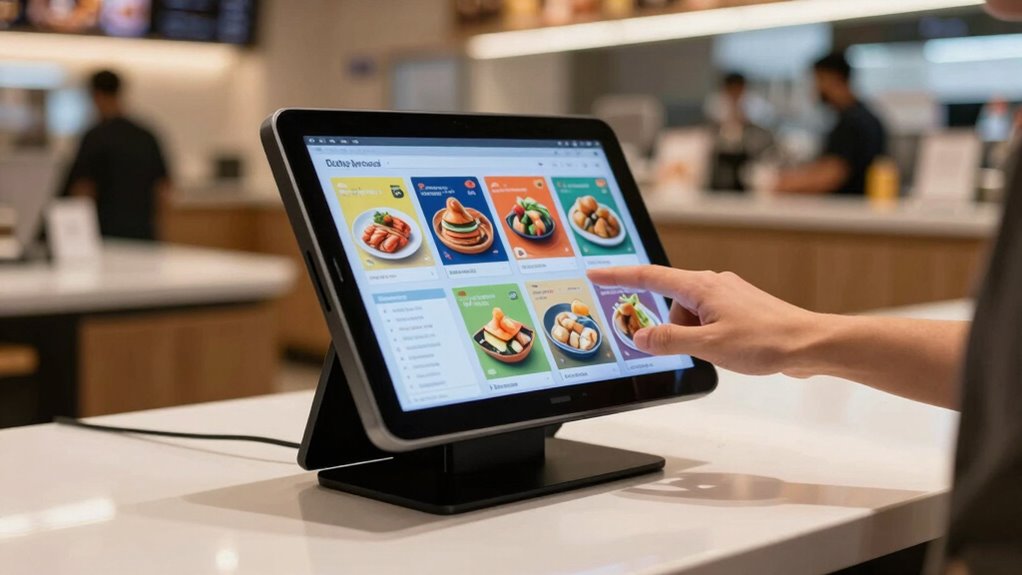
Choosing the right tablet kiosk for a self-ordering counter can significantly impact customer experience and operational efficiency. For 2026, I’ve identified five standout models, from compact POS stands to large-scale digital signage solutions. The 32 Inch Touch Screen Self Service Kiosk offers a durable, 24/7 capable solution ideal for indoor retail environments, though it requires additional setup. The 43 Inch Touch Screen Self Service Kiosk stands out with its large, vivid display and versatile OS options, making it perfect for high-traffic venues needing eye-catching signage and interaction. Meanwhile, the All-in-One Tablet POS Stand provides a compact, secure checkout station with built-in receipt printing, suited for busy retail counters. Each option involves tradeoffs around size, software readiness, and cost, which I will clarify to help you choose the best fit for your needs.

Get business pricing on office and shipping supplies
- Business-only prices and quantity discounts
- Tax-exempt purchasing
- Multiple users, one account, clear invoices
Key Takeaways
- Large displays (32-43 inches) enhance customer engagement but require more space and installation effort.
- Android-based kiosks excel in ease of use and app compatibility but may lack pre-installed software for specific applications.
- Durability and continuous operation are critical in high-traffic environments, favoring models with metal construction and 24/7 support.
- Mobility features like wheels are beneficial for flexible layouts, while fixed kiosks offer more stability.
- Choosing between a dedicated self-ordering kiosk and a versatile digital signage model depends on the primary use case and budget.
| 32 Inch Touch Screen Self Service Kiosk |  | Best for Durable Indoor Use | Display Size: 32 inches | Display Resolution: 1920 x 1080 (FHD) | Brightness: 500 nits | VIEW ON AMAZON | See Our Full Breakdown |
| 32 inch Touch Screen Kiosk with Android System, Digital Signage Display, K-Style Stand |  | Best for Interactive Signage & Self-Ordering | Display Size: 32 inches | Display Resolution: 1920×1080 | Brightness: 350 lm | VIEW ON AMAZON | See Our Full Breakdown |
| MWE 32 Inch Touch-screen Self Service Kiosk |  | Best for Versatile Connectivity & Mobility | Display Size: 32 inches | Resolution: 1920×1080 (FHD) | Brightness: 450 cd/m² | VIEW ON AMAZON | See Our Full Breakdown |
| 43 Inch Touch Screen Self Service Kiosk for Retail and Hospitality |  | Best for Large Scale Signage & High Visibility | Display Size: 43 inches | Resolution: 1920 x 1080 | Brightness: 450 cd/m² | VIEW ON AMAZON | See Our Full Breakdown |
| All-in-One Tablet POS Stand with Printer Compartment |  | Best for Compact, Organized Checkout | Form Factor: Desk stand | Compatible Devices: iPad 10.9/11″ | Mounting Type: Desktop | VIEW ON AMAZON | See Our Full Breakdown |
| tablet kiosks for self ordering counter | Display Size | Brightness |
|---|---|---|
| 32 Inch Touch Screen Self Serv | 32 inches | 500 nits |
| 32 inch Touch Screen Kiosk wit | 32 inches | 350 lm |
| MWE 32 Inch Touch-screen Self | 32 inches | 450 cd/m² |
| 43 Inch Touch Screen Self Serv | 43 inches | 450 cd/m² |
| All-in-One Tablet POS Stand wi | — | — |
More Details on Our Top Picks
32 Inch Touch Screen Self Service Kiosk
This 32-inch kiosk stands out for its large, high-resolution display and robust build, making it suitable for indoor environments like retail stores and restaurants. Its 10-point capacitive touch provides natural interaction, while the full HD screen ensures content is vivid and clear. Compared to smaller or less durable options, it offers reliable 24/7 operation, though you will need to handle software installation yourself, as it doesn’t come pre-loaded with specific applications. Its metal construction and tempered glass make it a solid choice for high-traffic settings that demand durability.
Pros:- Large 32-inch high-resolution display
- Responsive multi-touch interface
- Designed for 24/7 operation
Cons:- Requires setup and software configuration
- Price details not provided, potentially high cost
- Limited info on software updates
Best for: Indoor retail and restaurant environments needing a reliable, high-traffic solution
Not ideal for: Outdoor or weather-exposed locations, or users seeking ready-to-use software
- Display Size:32 inches
- Display Resolution:1920 x 1080 (FHD)
- Brightness:500 nits
- Viewing Angle:178 degrees
- Display Type:LCD
- Operating System:Android 13
Our verdict“A durable, high-res, large-display kiosk best suited for indoor high-traffic environments where reliability matters most.”
32 inch Touch Screen Kiosk with Android System, Digital Signage Display, K-Style Stand
This 32-inch Android kiosk offers vivid visuals and a sleek, professional look thanks to its K-style stand. Its full HD display with multi-touch support makes it ideal for digital signage, advertising, and self-ordering in retail or dining venues. The Android OS allows easy app installation and browsing, which simplifies deployment but can also add complexity if you need highly customized software. The stand enhances presentation, but the weight and durability details are limited, so it may not be suited for outdoor use or rough handling. Its ease of installation makes it appealing for businesses looking for a quick setup.
Pros:- Vivid, full HD multi-touch display
- Easy to install and operate with Android
- Stylish K-style stand enhances presentation
Cons:- Limited durability info
- Potentially higher cost for smaller setups
- Android system may require management for updates
Best for: Retailers and restaurateurs wanting an engaging, customizable digital display
Not ideal for: Outdoors or environments demanding weatherproofing or ruggedness
- Display Size:32 inches
- Display Resolution:1920×1080
- Brightness:350 lm
- Contrast Ratio:2000:1
- Response Time:5 ms
- Stand:K-style floor stand
Our verdict“A flexible, visually appealing kiosk ideal for engaging self-ordering and signage in controlled environments.”
MWE 32 Inch Touch-screen Self Service Kiosk
This 32-inch touchscreen kiosk emphasizes versatility, with a high-resolution LCD IPS display and multiple connectivity options. Its Android OS supports a range of applications, making it suitable for self-ordering, navigation, or information display in busy retail or hospitality settings. Its mobility features, like wheels, add flexibility for repositioning, but its weight and setup complexity can be drawbacks if space or installation time are limited. The included speakers and durable build make it a good all-round choice for indoor high-traffic use, especially where content variety and easy maintenance are priorities.
Pros:- High-res 32-inch FHD display
- Multiple connectivity options
- Mobility with wheels included
Cons:- No pre-installed software
- Potential setup complexity
- Limited details on power consumption
Best for: High-traffic venues needing adaptable, mobile self-ordering stations
Not ideal for: Outdoor settings or environments requiring weatherproof solutions
- Display Size:32 inches
- Resolution:1920×1080 (FHD)
- Brightness:450 cd/m²
- Contrast Ratio:2000:1
- Ports:HDMI, USB, Component
- Mobility:Wheels included
Our verdict“A flexible, feature-rich kiosk suited for dynamic indoor environments with high traffic and content needs.”
43 Inch Touch Screen Self Service Kiosk for Retail and Hospitality
This larger 43-inch kiosk offers a vivid, wide-angle IPS display suitable for retail, restaurants, and malls. Its support for both Android 13 and Windows provides deployment flexibility, and its 24/7 operation ensures reliability in busy environments. The remote management capabilities and mobility features like wheels make it ideal for digital signage, wayfinding, or interactive ordering. However, its size demands significant space and careful planning for installation. It’s best suited for environments where visual impact and content versatility outweigh space constraints.
Pros:- Vivid IPS display with wide angles
- Supports Android and Windows
- Built for 24/7 operation
Cons:- Large footprint requires ample space
- No mention of built-in camera or microphone
- Potential higher cost
Best for: High-traffic retail or hospitality venues requiring impactful digital signage
Not ideal for: Small spaces or outdoor locations without weather protection
- Display Size:43 inches
- Resolution:1920 x 1080
- Brightness:450 cd/m²
- Viewing Angle:178°
- Operating System:Android 13 / Windows
- Connectivity:HDMI, USB, LAN
Our verdict“A large, versatile kiosk designed for high-visibility environments where impactful visual communication is key.”
All-in-One Tablet POS Stand with Printer Compartment
This all-metal desktop kiosk combines a secure tablet mount with a built-in printer compartment, streamlining checkout processes. Its adjustable tilt and lockable enclosure make it suitable for busy retail and hospitality counters where space efficiency and security are priorities. While it offers full device access and organized printing, its size might be an obstacle in tight spaces, and it supports only specific iPad models. It’s an excellent choice for a tidy, secure point-of-sale station, though not ideal for high-mobility scenarios or environments requiring larger displays.
Pros:- Secure lockable enclosure with full device access
- Adjustable tilt for ergonomic use
- Includes receipt printer compartment
Cons:- Large desk footprint
- Limited compatibility with only certain iPads
- No cable management features
Best for: Retail counters and hospitality checkouts needing organized, secure POS solutions
Not ideal for: Large-scale digital signage or outdoor applications
- Form Factor:Desk stand
- Compatible Devices:iPad 10.9/11″
- Mounting Type:Desktop
- Special Features:Adjustable, lockable
Our verdict“A durable, organized POS stand perfect for busy counters where security and space efficiency matter.”
How We Picked
Our selection process focused on models designed explicitly for self-ordering and customer interaction, emphasizing durability, screen quality, and ease of use. I compared display size, OS options, connectivity, and mobility features, ensuring each product can handle high-traffic demands and offers reliable operation. Cost considerations and software flexibility also influenced rankings, alongside user-friendly design and compatibility with retail or hospitality environments. Each pick balances these factors against specific use cases to guide different buyer needs.
Factors to Consider When Choosing Tablet Kiosks For Self Ordering Counters
Selecting the ideal tablet kiosk for self-ordering involves understanding your environment, content needs, and operational priorities. Size, durability, software flexibility, and mobility are key factors that influence your choice. Whether you need a compact point-of-sale stand or a large digital signage kiosk, matching features to your specific use case ensures a smooth deployment and satisfied customers.Size and Display Quality
Think about your space constraints and visibility requirements. Larger screens, like the 43-inch model, provide high impact but need ample room and proper mounting. Smaller options might fit tighter spaces but could sacrifice visual engagement. Always prioritize high resolution and brightness for clear, vibrant content, especially in well-lit environments.
Durability and Continuous Operation
For high-traffic settings, look for kiosks with sturdy construction—metal frames, tempered glass, and IP-rated enclosures. Devices like the 32-inch touch screen kiosk designed for 24/7 use handle continuous operation better. Consider environment-specific features like weatherproofing if outdoor use is planned.
Software and Compatibility
Android offers ease of app deployment and flexibility, making it popular for self-ordering and signage. Windows options add versatility for complex software needs. Be mindful whether pre-installed software is available or if you’ll need to configure applications manually. Compatibility with existing POS or management systems can also influence your choice.
Mobility and Installation
Wheels and adjustable stands provide flexibility for repositioning or reconfiguration, which is useful in dynamic spaces. Fixed kiosks tend to be more stable but less adaptable. Keep space and layout considerations in mind when selecting mobility features.
Frequently Asked Questions
What size touchscreen should I choose for my self-ordering kiosk?
The ideal size depends on your space and visibility needs. Larger screens, like 43 inches, offer high impact and are great for environments with plenty of room, such as malls or large restaurants. Smaller options, around 32 inches, fit better in tight spaces and are easier to install, but may not command as much attention.
Is Android or Windows better for self-ordering kiosks?
Android is generally more user-friendly and easier to deploy, with many apps readily available for ordering and signage. Windows provides more flexibility for complex software integrations and enterprise solutions. Your choice should align with your existing infrastructure and specific software requirements.
How important is durability for a self-ordering kiosk?
Durability is crucial in high-traffic environments. Look for kiosks with metal frames, tempered glass, and features designed for continuous operation. Devices meant for 24/7 use reduce downtime and maintenance costs, ensuring your self-ordering system remains reliable during busy hours.
Should I consider mobility features like wheels?
Wheels and adjustable stands add flexibility, allowing you to reposition kiosks easily for different events or space configurations. However, mobile units may sacrifice some stability and security, so weigh these factors based on your environment and security needs.
What connectivity options should I look for?
Look for kiosks with HDMI, USB, Ethernet, and Wi-Fi support to ensure seamless content management and integration with your existing systems. Multiple connectivity options provide flexibility for content updates, peripherals, and network stability, which are vital for smooth operation.
Conclusion
If you need a rugged, high-capacity solution for indoor, high-traffic environments, the 32 Inch Touch Screen Self Service Kiosk or the 43 Inch Model will serve you well, with durability and visibility as top priorities. For retail counters where space is limited but security and organized checkout matter, the All-in-One Tablet POS Stand offers a compact, secure option. Those seeking versatile, engaging signage or flexible positioning should consider the 32 inch Android kiosk or the larger 43-inch model. Matching your environment, traffic levels, and software needs will ensure your self-ordering setup enhances customer experience and operational efficiency in 2026.