
Choosing the right security camera system for an office requires balancing coverage, clarity, and ease of management. The best overall pick offers reliable, high-quality footage and simple setup, like the Reolink 16-Channel 4K Security Bullet Camera System. However, some options prioritize affordability or wireless convenience, such as the Hiseeu 4K Wireless WiFi System. The main tradeoffs involve wired versus wireless setups, resolution quality, and storage capacity. Continue reading to discover which system best suits your office’s size, security needs, and budget.

Get business pricing on office and shipping supplies
- Business-only prices and quantity discounts
- Tax-exempt purchasing
- Multiple users, one account, clear invoices
Key Takeaways
- High-resolution systems like 4K cameras provide clearer footage but often come with higher costs and storage needs.
- Wired systems tend to offer more reliable connections, especially in larger office spaces, compared to wireless options which simplify installation.
- Storage capacity varies significantly; larger HDDs or SSDs are essential for longer retention periods in busy offices.
- Ease of setup and management features, such as remote access and user-friendly apps, are critical for non-technical staff.
- Budget constraints often influence whether a buyer opts for a comprehensive 16-channel system or a simpler 4-channel setup.
| ANNKE 8CH H.265+ 3K Lite Wired Security Camera System, 4x 2MP Cameras, 1TB HDD |  | Best Overall for High-Resolution Wired Office Surveillance | Number of Cameras: 4 | Camera Resolution: 2MP | Video Capture Resolution: 3K Lite | VIEW ON AMAZON | See Our Full Breakdown |
| 2K Indoor/Outdoor Home Security Cameras with Color Night Vision and 2-Way Audio |  | Best for Easy Setup and Versatile Indoor/Outdoor Use | Resolution: 2K (3MP) | Night Vision: Color Night Vision | Storage: Supports Micro SD up to 128GB, Cloud available | VIEW ON AMAZON | See Our Full Breakdown |
| ANNKE 3K Lite Wired Security Camera System Outdoor, 8 Cameras, 1TB HDD | 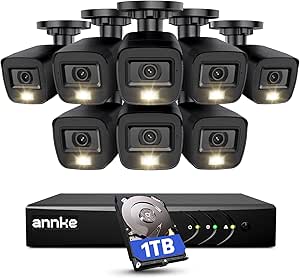 | Best for Outdoor Office Security with Smart Detection | AI Motion Detection: Human & vehicle detection | Number of Cameras: 8 | Video Resolution: 1080p | VIEW ON AMAZON | See Our Full Breakdown |
| Reolink 16-Channel 4K Security Bullet Camera System with 4TB HDD |  | Best for Ultra HD Office Surveillance and Smart Detection | Resolution: 4K Ultra HD (8MP) | Channels: 16 | HDD Capacity: 4TB (expandable up to 16TB) | VIEW ON AMAZON | See Our Full Breakdown |
| ANNKE 8CH 3K Lite Wired Security Camera System, 8 Cameras, 1TB Hard Drive | 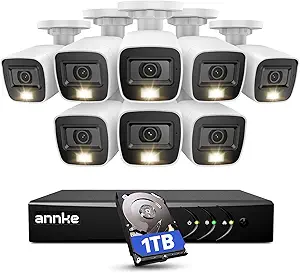 | Best for Versatile Multi-Format Surveillance with AI Detection | Number of Cameras: 8 | Hard Drive Capacity: 1TB (supports up to 10TB) | Video Resolution: 3K/5MP | VIEW ON AMAZON | See Our Full Breakdown |
| Hiseeu 100ft Wireless WiFi Security Camera System with 4 Cameras, 4K NVR, 1TB HDD, Night Vision, Motion Detection, Outdoor Waterproof |  | Best Overall for Versatile Outdoor Office Security | Resolution: 4K | Number of Cameras: 4 | Storage Capacity: 1TB HDD | VIEW ON AMAZON | See Our Full Breakdown |
| Hiseeu 4K Wired Security Camera System, 8 Cameras, 3TB HDD |  | Best for High-Resolution Large-Scale Office Coverage | Resolution: 4K (8MP) | Number of Cameras: 8 | Hard Drive Capacity: 3TB | VIEW ON AMAZON | See Our Full Breakdown |
| Hiseeu 4K Security Camera System, 8 Pcs 8MP PoE Cameras |  | Best for High-Resolution, Wide-Angle Office Monitoring | Camera Resolution: 8MP (3840x2160p) | Viewing Angle: 121° | Night Vision: Color Night Mode, Black-and-White | VIEW ON AMAZON | See Our Full Breakdown |
| 4CH Wired Security Camera System with 4 Cameras, 1080P, 512GB HDD, Night Vision, Waterproof |  | Best for Cost-Effective Indoor or Small Office Surveillance | Number of Cameras: 4 | Video Capture Resolution: 1080p | Storage Capacity: 512 GB | VIEW ON AMAZON | See Our Full Breakdown |
| 4-Channel Wired Security Camera System with 1080P Cameras and 512GB HDD |  | Best Compact Wired System for Small Office or Home Use | Number of Channels: 4 | Video Capture Resolution: 1080p | Memory Storage Capacity: 512 GB | VIEW ON AMAZON | See Our Full Breakdown |
| security camera systems for office | Number of Cameras | Night Vision Range |
|---|---|---|
| ANNKE 8CH H.265+ 3K Lite Wired | 4 | 100 feet |
| 2K Indoor/Outdoor Home Securit | — | — |
| ANNKE 3K Lite Wired Security C | 8 | 100 feet in B&W, 66 feet in color |
| Reolink 16-Channel 4K Security | — | — |
| ANNKE 8CH 3K Lite Wired Securi | 8 | — |
| Hiseeu 100ft Wireless WiFi Sec | 4 | 65 feet |
| Hiseeu 4K Wired Security Camer | 8 | — |
| Hiseeu 4K Security Camera Syst | 8 | — |
| 4CH Wired Security Camera Syst | 4 | 100 feet |
| 4-Channel Wired Security Camer | — | 100 feet |
More Details on Our Top Picks
ANNKE 8CH H.265+ 3K Lite Wired Security Camera System, 4x 2MP Cameras, 1TB HDD
This system stands out for its impressive 3K Lite resolution, offering detailed footage that surpasses the standard 1080p options like the ANNKE 8CH 3K Lite Wired Security Camera System. Its AI motion detection and weatherproof cameras make it well-suited for outdoor office environments needing reliable, around-the-clock monitoring. The wired setup ensures stable video feed but limits placement flexibility, and the default 1TB HDD may require upgrades for larger storage needs. Compared to wireless systems, it demands more complex installation, which could be a barrier for smaller teams or those seeking quick setup. Overall, this pick fits offices prioritizing high-quality, local storage without ongoing fees, but it trades off ease of installation.
Pros:- High-resolution 3K Lite video quality for clear footage
- Advanced AI human and vehicle detection improves alert accuracy
- Weatherproof cameras suitable for outdoor use
- No monthly fees with local storage
Cons:- Requires wired installation, which can be complex
- Limited to 1TB HDD out of the box, may need upgrades for larger storage
Best for: Offices that require high-resolution, reliable wired surveillance with AI detection and are prepared for a more involved setup process.
Not ideal for: Small startups or offices with limited technical resources that prefer quick, wireless installation without extensive wiring.
- Number of Cameras:4
- Camera Resolution:2MP
- Video Capture Resolution:3K Lite
- HDD Capacity:1TB (supports up to 10TB)
- Channels:8
- Night Vision Range:100 feet
- Connectivity:Wired
- Video Frame Rate:1080P@30fps
- Recording Mode:Event, Schedule
Our verdict“This system is ideal for offices needing detailed wired surveillance with AI features and local storage, accepting a more complex installation process.”
2K Indoor/Outdoor Home Security Cameras with Color Night Vision and 2-Way Audio
This camera excels with its 2K resolution and color night vision, providing crisp, detailed footage for both indoor and outdoor office spaces where quick deployment matters. Its Wi-Fi connectivity, support for local micro SD cards up to 128GB, and two-way audio make it a flexible solution for offices with moderate security needs. Compared to wired options like the ANNKE 8CH 3K Lite System, it offers simpler installation but relies heavily on Wi-Fi stability. Its limited storage capacity and complex setup instructions could pose challenges for less tech-savvy users. This model suits offices valuing ease of use and mobility over extensive storage or wired infrastructure.
Pros:- High-resolution 2K video with full-color night vision
- Weatherproof design suitable for outdoor use
- Two-way audio enables real-time communication
- Flexible mounting options
Cons:- Memory card not included, needs additional purchase
- Dependent on Wi-Fi network, which may affect reliability
- Setup instructions could be complex for some users
Best for: Small to medium offices seeking straightforward, wireless surveillance with clear video and communication features.
Not ideal for: Large offices or environments with unreliable Wi-Fi, where wired systems like the Reolink 16-Channel 4K would provide more stability and capacity.
- Resolution:2K (3MP)
- Night Vision:Color Night Vision
- Storage:Supports Micro SD up to 128GB, Cloud available
- Connectivity:Wi-Fi 2.4G
- Viewing Angle:105 degrees
- Zoom:8x Digital Zoom
- Audio:Two-Way Audio
- Power:Plug-in
- Water Resistance:Waterproof
Our verdict“This camera is a strong choice for offices prioritizing easy installation and clear, versatile surveillance in both indoor and outdoor settings.”
ANNKE 3K Lite Wired Security Camera System Outdoor, 8 Cameras, 1TB HDD
This outdoor-focused system features eight 2MP cameras with full-color night vision and AI motion detection, making it suitable for offices needing comprehensive perimeter surveillance. The wired setup ensures stable video feeds, but installation can be intricate, especially with multiple cameras. Its 1TB HDD may limit recording duration unless upgraded, which could be necessary for larger properties or longer-term storage. Compared to wireless systems, it requires more initial effort but offers greater reliability and security. This system is well suited for offices that value continuous, all-weather monitoring and are prepared for a technical setup.
Pros:- High-quality 2MP cameras with full-color night vision
- AI human and vehicle detection for accurate alerts
- Weatherproof and suitable for outdoor environments
- Supports flexible camera compatibility and storage options
Cons:- Requires wired installation, which may be complex
- Default 1TB HDD may need upgrades for extensive recording
- Some features may require technical knowledge to configure
Best for: Offices with outdoor areas or perimeters requiring durable, high-quality surveillance and dedicated wired installation capacity.
Not ideal for: Small offices with limited outdoor space or teams seeking quick, wireless solutions that require minimal setup.
- AI Motion Detection:Human & vehicle detection
- Number of Cameras:8
- Video Resolution:1080p
- HDD Capacity:1TB (supports up to 10TB)
- Night Vision Range:100 feet in B&W, 66 feet in color
- Connectivity:Wired
- Frame Rate:1080P@30fps
- Operating System:Embedded Linux
- Video Inputs:BNC, HDMI, VGA
Our verdict“Ideal for outdoor office security with a preference for wired reliability and smart detection, accepting a more involved installation process.”
Reolink 16-Channel 4K Security Bullet Camera System with 4TB HDD
This system’s 4K Ultra HD resolution offers exceptionally detailed footage, ideal for large offices or facilities needing precise visual records. The 16-channel setup combined with a 4TB HDD supports extensive coverage and long-term storage, surpassing the capacity of smaller systems like the ANNKE 8CH 3K Lite. Its plug-and-play PoE installation simplifies setup compared to traditional wired models, yet it requires compatible power supplies and does not integrate with smart home systems such as Alexa. Its high cost and specific hardware requirements make it less flexible for smaller offices or those seeking wireless options. This system’s strength lies in its high resolution and extensive storage for demanding security environments.
Pros:- Ultra HD 4K resolution for detailed footage
- Smart detection of people, vehicles, and animals reduces false alarms
- Large 4TB HDD supports extensive recording
- Remote access via mobile app
Cons:- Cameras are not Wi-Fi compatible, requiring wired setup
- Requires PoE power supply, incompatible with some smart home devices
- Cameras only work with Reolink PoE NVR
Best for: Large offices or facilities prioritizing ultra-high-definition footage and extensive monitoring capabilities, with the technical capacity for PoE setup.
Not ideal for: Small businesses or offices seeking simpler, wireless solutions, or those without PoE infrastructure.
- Resolution:4K Ultra HD (8MP)
- Channels:16
- HDD Capacity:4TB (expandable up to 16TB)
- Connectivity:PoE
- Remote Access:Yes
- Detection Features:Person/Vehicle/Animal Detection
- Warranty:2 years
Our verdict“Best suited for large office environments needing ultra-high-resolution, long-term storage, and are equipped for PoE installation, accepting a higher setup complexity.”
ANNKE 8CH 3K Lite Wired Security Camera System, 8 Cameras, 1TB Hard Drive
This versatile wired system supports multiple video formats—TVI, AHD, CVI, CVBS, and IP—making it adaptable to various existing setups, unlike the fixed-format cameras of the Reolink 16-Channel 4K. The 8 cameras deliver 3K/5MP resolution with full-color night vision, offering clear, reliable footage around the clock. Its AI motion detection provides accurate alerts for human and vehicle activity, and weatherproof design ensures outdoor durability. The default 1TB HDD might limit recordings for larger offices, and installation complexity may be high for those unfamiliar with multiple formats or wiring. This system is well-suited for offices with diverse camera needs and existing infrastructure that can support wired connections.
Pros:- Supports multiple camera formats for compatibility
- High-resolution 3K/5MP video with full-color night vision
- AI motion detection improves alert accuracy
- Weatherproof, suitable for outdoor environments
Cons:- Requires wired installation, which can be complex
- Limited 1TB HDD may need upgrades for extended storage
- Advanced setup may be challenging for non-technical users
Best for: Offices with existing wired infrastructure needing flexible, multi-format camera support combined with high-resolution, AI-enhanced surveillance.
Not ideal for: Small or new offices seeking plug-and-play, wireless solutions or those with limited technical resources for complex wiring.
- Number of Cameras:8
- Hard Drive Capacity:1TB (supports up to 10TB)
- Video Resolution:3K/5MP
- Night Vision:Full color up to 66ft, B&W up to 100ft
- Supported Formats:TVI, AHD, CVI, CVBS, IP
- Power:Wired
Our verdict“This system is a flexible choice for offices needing multi-format, high-resolution wired surveillance with AI features, accepting installation complexity.”
Hiseeu 100ft Wireless WiFi Security Camera System with 4 Cameras, 4K NVR, 1TB HDD, Night Vision, Motion Detection, Outdoor Waterproof
This system stands out for its combination of high-resolution 4K video, weatherproof outdoor cameras, and flexible connectivity options, making it suitable for various office environments. Unlike the Hiseeu 4K Wired Security Camera System, it supports both WiFi and wired power, offering easier setup in locations where running cables is challenging. However, the wireless setup introduces some complexity for non-technical users and limits the frame rate to 15fps, which may affect motion clarity. Its expandable channel support up to 10 makes it ideal for growing office sites, but the need for wired power can be a limitation in certain outdoor placements.
Pros:- High-resolution 4K video quality with night vision
- Supports local storage with 1TB HDD, no monthly fees
- Weatherproof design suitable for outdoor conditions
- Expandable up to 10 channels for larger coverage
Cons:- Requires wired power connection for cameras
- Setup may be complex for non-technical users
- Limited to 15fps frame rate which may affect motion clarity
Best for: Offices needing flexible outdoor surveillance with high resolution and expandability, especially where wiring is limited
Not ideal for: Small office spaces or indoor-only environments where simplicity and minimal setup are preferred
- Resolution:4K
- Number of Cameras:4
- Storage Capacity:1TB HDD
- Night Vision Range:65 feet
- Weatherproof:Yes
- Expandable to:10 channels
Our verdict“This system suits office spaces that prioritize outdoor flexibility and high-res coverage without wired constraints, despite some setup complexity.”
Hiseeu 4K Wired Security Camera System, 8 Cameras, 3TB HDD
Compared with the wireless Hiseeu 100ft WiFi System, this wired setup delivers consistent, high-quality footage with less concern about signal interference. Its 8 cameras with 4K resolution and 3TB HDD support up to 15 days of continuous recording, making it ideal for offices requiring persistent surveillance without relying on internet stability. The AI detection enhances security, but the wired installation process can be cumbersome, especially in existing office structures. Night vision modes, while effective, have limited range, requiring strategic placement for comprehensive coverage.
Pros:- High-resolution 4K (8MP) video quality
- AI detection reduces false alarms
- Weatherproof design for outdoor use
- Large 3TB HDD supports extended recording periods
Cons:- Requires extensive wired installation
- Limited to 15 days of recording without cloud backup
- Night vision range may be limited for large outdoor areas
Best for: Large offices or facilities that prefer high-resolution wired systems with long-term local storage
Not ideal for: Small or temporary office setups where quick installation and flexibility are priorities
- Resolution:4K (8MP)
- Number of Cameras:8
- Hard Drive Capacity:3TB
- Night Vision:Infrared and Spotlight Color Mode
- Weatherproof Standard:IP67
- Recording Duration:Up to 15 days
Our verdict“Ideal for large, permanently installed office environments where long-term, high-res wired surveillance is needed, despite installation effort.”
Hiseeu 4K Security Camera System, 8 Pcs 8MP PoE Cameras
This system excels in delivering detailed, 8MP footage with a broad 121° viewing angle, making it perfect for comprehensive office coverage. The PoE (Power over Ethernet) setup simplifies wiring by combining power and data, unlike the wireless options, but it requires a reliable internet connection for remote viewing and system expansion. Its AI detection for humans and vehicles enhances security accuracy, although it lacks specified weatherproof features, which could limit outdoor durability. The system’s ability to support multiple playback options makes it versatile for busy office environments.
Pros:- 8MP high-resolution footage for detail-rich monitoring
- Wide 121° viewing angle covers large areas
- AI detection improves alert accuracy
- Supports local and remote access with multiple playback options
Cons:- Requires reliable internet for remote access
- Expansion may need additional PoE switches
- No explicit weatherproofing details for outdoor use
Best for: Offices seeking high-resolution, wide-angle monitoring with simplified wiring and AI alerts
Not ideal for: Small or indoor-only offices that do not require a wide field of view or outdoor durability
- Camera Resolution:8MP (3840x2160p)
- Viewing Angle:121°
- Night Vision:Color Night Mode, Black-and-White
- Recording Storage:2TB HDD
- Number of Cameras:8
- Expandable Ports:16CH (with additional switch)
Our verdict“Best suited for offices prioritizing detailed, wide-angle coverage with straightforward wiring and intelligent alerts, but dependent on network stability.”
4CH Wired Security Camera System with 4 Cameras, 1080P, 512GB HDD, Night Vision, Waterproof
This system provides reliable 1080P resolution with weatherproof cameras, making it suitable for outdoor or indoor offices on a budget. Its pre-installed 512GB HDD supports continuous, local recording, akin to the 4-Channel Wired System, but at a lower resolution and storage capacity. While its remote access via a mobile app offers flexibility, the wired setup limits placement options, especially in existing structures. Night vision up to 100 feet ensures decent coverage, but the resolution may fall short for detailed forensic needs.
Pros:- 1080P HD video quality with good night vision
- Weatherproof and rust-proof cameras suitable for outdoor use
- Pre-installed 512GB HDD for continuous recording
- Remote access via mobile app for convenience
Cons:- Limited to wired installation, reducing flexibility
- Lower resolution compared to 4K systems
- No mention of advanced AI detection features
Best for: Small offices or indoor environments needing basic, affordable surveillance with remote viewing
Not ideal for: Large office complexes or outdoor environments requiring high resolution or extensive coverage
- Number of Cameras:4
- Video Capture Resolution:1080p
- Storage Capacity:512 GB
- Night Vision Range:100 feet
- Weatherproof:Yes
- Video Format:Analog
Our verdict“A solid choice for small or indoor office spaces seeking affordable, reliable surveillance with remote access, despite resolution limits.”
4-Channel Wired Security Camera System with 1080P Cameras and 512GB HDD
Similar in features to the 4CH Wired System, this setup provides reliable 1080P video, weather-resistant cameras, and local storage, making it suitable for smaller office environments. Its pre-installed 512GB HDD supports continuous recording with remote access via mobile app, but the system’s limited 4-camera capacity may not cover larger properties. The wired configuration ensures stable feeds, yet it restricts placement flexibility, especially in multi-room office setups. Its straightforward design makes it an excellent entry-level option, though it lacks advanced AI or high-res features found in larger systems.
Pros:- 1080P HD video with clear night vision
- Weatherproof and durable for outdoor use
- Pre-installed 512GB HDD supports continuous recording
- Remote monitoring via mobile app
Cons:- Limited to 4 cameras, less scalable
- Requires wired installation, limiting placement options
- No high-resolution or AI detection features
Best for: Small offices or remote workers needing dependable, straightforward surveillance with easy setup
Not ideal for: Large or outdoor office environments requiring extensive camera coverage or high-resolution footage
- Number of Channels:4
- Video Capture Resolution:1080p
- Memory Storage Capacity:512 GB
- Night Vision Range:100 feet
- Weather Resistance:IP68 Waterproof
- Connectivity Technology:Wired
Our verdict“Best for small or indoor office setups that prioritize reliable, straightforward surveillance without complex features.”
How We Picked
These products were evaluated based on performance, build quality, ease of installation, and feature set tailored to office environments. We prioritized systems with high-resolution cameras, reliable connectivity, and sufficient storage options to handle continuous footage. Cost-effectiveness was also a factor, ensuring each system offers good value for different office sizes and budgets. The ranking reflects a balance between advanced features and practical usability, helping decision-makers identify the best fit for their specific security needs.Factors to Consider When Choosing Security Camera Systems For Offices
Selecting a security camera system for an office involves understanding several key factors that influence performance, reliability, and ongoing management. Beyond just camera resolution, considerations include installation complexity, connectivity options, storage capacity, and system scalability. Making the right choice can prevent future upgrades or security gaps, so it’s important to weigh these factors carefully to match your office’s specific requirements.Resolution and Video Quality
Higher resolution cameras, such as 4K or 3K models, deliver sharper images that can help identify faces and license plates more clearly. However, they also require larger storage capacity and higher bandwidth, which can increase costs. Balancing resolution with storage and network infrastructure is key—if the office has limited bandwidth, opting for 2K or 1080p might be more practical while still providing sufficient detail for security purposes.
Wired vs. Wireless Systems
Wired systems generally offer more consistent connections and are less susceptible to interference, making them suitable for larger or more complex office layouts. Wireless options are easier to install and can be relocated more freely, which is advantageous in dynamic office environments or where running cables is difficult. However, wireless cameras depend heavily on WiFi strength; poor connectivity can result in lag or dropped footage, so assess your network stability before choosing wireless solutions.
Storage Capacity and Management
Effective storage ensures that footage is retained for the necessary period without frequent manual downloads. Larger HDDs, like 3TB or 4TB options, are better suited for offices with high activity levels or longer retention policies. Cloud storage can offer flexibility but may involve ongoing costs. Consider whether the system offers easy access and management for stored footage, and whether local or cloud solutions align with your security policies and budget.
Ease of Installation and Use
A straightforward setup process saves time and reduces frustration, especially for small teams without dedicated IT staff. User-friendly apps and remote viewing features are also essential for quick access and monitoring from anywhere. While wireless systems can be appealing for DIY installation, ensure your network supports the bandwidth and security features needed to protect sensitive footage from cyber threats.
Scalability and Future Proofing
Office security needs evolve, so choosing a system that can expand is wise. Look for systems with modular components or additional channels to add more cameras later. Consider compatibility with existing infrastructure, and whether the system supports integrations like access control or alarm triggers. Planning for future growth helps avoid costly upgrades or replacements down the line.
Frequently Asked Questions
How do I choose between wired and wireless security cameras for my office?
Wired cameras tend to offer more reliable and consistent footage, especially in larger or complex office environments where WiFi signals may weaken. They are less prone to interference and often support higher bandwidths, making them suitable for high-resolution recording. Wireless cameras are easier to install and relocate, which benefits smaller or dynamic offices, but require a stable WiFi connection to function effectively. Your choice should consider your office layout, network quality, and long-term security needs.
What resolution do I need for effective office surveillance?
For most office environments, a resolution of 2K or 3K provides a good balance of detail and storage efficiency. Higher resolutions like 4K offer the clearest images, which can be crucial for identifying faces or license plates, but they demand more storage and bandwidth. Conversely, 1080p cameras are more affordable and easier to manage, making them suitable for smaller spaces or budget-conscious setups. Consider your specific security goals when selecting resolution—higher isn’t always necessary for every application.
Is cloud storage worth the extra cost for office security systems?
Cloud storage offers flexibility and remote access, making it appealing for offices that need to monitor footage from multiple locations or are concerned about physical storage failures. However, ongoing subscription fees can add up over time, and internet bandwidth must be sufficient to upload continuous footage. Local storage solutions like HDDs provide a one-time cost and greater control, but require physical maintenance and management. Weigh your security requirements and budget to determine which option aligns best with your office setup.
How important is night vision in an office security system?
Night vision capability is vital if your office operates outside regular hours or in low-light conditions. Infrared or color night vision enhances visibility during dark periods, helping to identify intruders or suspicious activity. While most modern cameras include some form of night vision, the quality varies—look for models with longer-range IR and good image clarity in darkness. Neglecting this feature can leave blind spots during non-daylight hours, reducing overall security effectiveness.
Can I upgrade or expand my office security system later?
Many modern systems are designed with scalability in mind, allowing you to add more cameras or upgrade components over time. When selecting a system, verify compatibility with additional cameras and whether it supports future integrations like access control or alarm systems. Choosing a flexible, modular system can save money and hassle as your office grows or security priorities shift. However, be cautious to avoid systems with proprietary hardware or limited expansion options, which could restrict future upgrades.
Conclusion
For offices needing a reliable all-around solution, the Reolink 16-Channel 4K Security Bullet Camera System stands out as the best overall choice, offering high resolution and extensive coverage. Smaller or budget-conscious offices might find the ANNKE 8CH H.265+ 3K Lite Wired System provides excellent value with solid performance at a lower cost. For those prioritizing ease of installation and wireless flexibility, the Hiseeu 4K Wireless WiFi System makes sense, though it may sacrifice some stability. Larger enterprises or high-security environments should consider systems with more channels and storage capacity, like the Reolink 16-Channel 4K System. Ultimately, your decision should reflect your office size, security needs, and future plans—matching the right system to your specific context ensures peace of mind and reliable protection.”
Halloween Picks
halloween
As an affiliate, we earn on qualifying purchases.