Choose a business card holder that fits your work, carries your cards without bending them, and makes exchanges at meetings straightforward. This guide is for professionals who need to select a holder or replace one that is worn, awkward, or too small. Allow about 20-40 minutes to compare options, check your cards, and set up the holder.

Get business pricing on office and shipping supplies
- Business-only prices and quantity discounts
- Tax-exempt purchasing
- Multiple users, one account, clear invoices

MaxGear Business Card Holder – PU Leather, Black Carbon
- ✔ Material: PU faux leather
- ✔ Lining: Stainless steel
- ✔ Color: Black Carbon
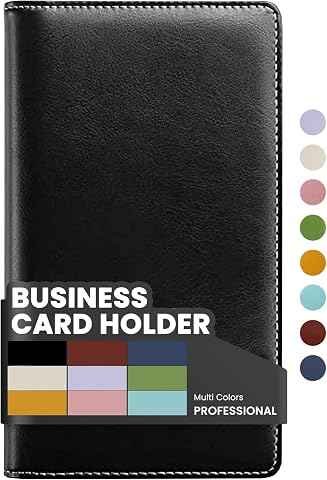
Sooez Leather Professional Business Card Book Holder Organizer for 240 Card
- ✔ Capacity: Up to 240 cards
- ✔ Dimensions: 7.7 × 4.5 × 0.7 inches
- ✔ Cover material: PU leather

PU Leather Business Card Holder with Magnetic Closure – Slim Pocket (Brown)
- ✔ Dimensions: 4 × 2.56 × 0.75 inches
- ✔ Material: Faux PU leather
- ✔ Color: Coffee Brown
Difficulty: Beginner | Time: 20-40 minutes
What You’ll Need
Tools & Materials:
- A sample of your current business card
- A ruler, if your cards have a nonstandard size
- Your usual work bag, pocket, or desk
Knowledge:
- How often you exchange cards
- Where you usually carry or store them
Use the cards you plan to carry when checking fit. Card dimensions and thickness vary, and a holder that fits a standard card may not suit a folded, square, or unusually thick card.
MaxGear Business Card Holder – PU Leather, Black Carbon
For professionals who regularly hand out cards, the MaxGear offers the most balanced mix of compact carry and practical protection in this group. At 3.7 inches tall and 2.4 inches wide, it is sized for a pocket or briefcase, and its stated 15–25 standard-card capacity supports a modest working supply without taking on the bulk of a book organizer. The magnetic flip closure also gives quick access while keeping the case shut between meetings.Compared with the Sooez, MaxGear is built for carrying cards to an appointment rather than storing a large network in one place. Its listed RFID blocking and stainless steel interior are distinguishing details the other two descriptions do not claim. The tradeoff is limited capacity, especially if we use thicker stock, and the PU exterior may show wear sooner than genuine leather. Choose it for daily exchanges; skip it if we need to sort hundreds of collected cards.
Pros:
- Slim dimensions suit pocket or briefcase carry.
- Magnetic flip closure allows quick access.
- RFID blocking is listed in the product specifications.
- Stainless steel interior adds structure beneath the PU exterior.
Cons:
- Capacity is limited to 15–25 standard cards.
- Thicker cards may reduce the usable capacity.
- PU leather may show wear sooner than genuine leather.
Best for: Professionals who carry a small supply of standard business cards and want a slim, magnetic case with listed RFID blocking.
Not ideal for: People who need to store a large collection, carry thick card stock, or prefer genuine leather.
Bottom line: For everyday professional exchanges, MaxGear is the most versatile pick here, provided a 15–25-card capacity is enough.
“For everyday professional exchanges, MaxGear is the most versatile pick here, provided a 15–25-card capacity is enough.”
Sooez Leather Professional Business Card Book Holder Organizer for 240 Card
When a professional day involves collecting cards from many people, the Sooez organizer solves a different problem from the slim MaxGear case. Its book-style format stores up to 240 cards in transparent PVC pockets, making names and details easier to scan than a loose stack. That capacity is useful for networking events, sales work, or maintaining a portable contact archive.At 7.7 by 4.5 by 0.7 inches, it remains relatively compact for a book organizer, but it is much larger than either magnetic case. The PU cover gives it a finished exterior, while the clear sleeves favor sorting and retrieval over fast one-card presentation. Compared with MaxGear and the brown holder, it lacks a listed closure, so cards may shift if we toss it into a bag or carry it loosely. There are also no dedicated compartments for cash or coins. We should pick Sooez when organized volume matters more than pocket-ready access.
Pros:
- Holds up to 240 cards in one organizer.
- Transparent sleeves make card details quick to scan.
- Book-style format provides an orderly way to store a collection.
- PU cover and PVC pockets are designed for portable organization.
Cons:
- No zip or other closure is listed, so cards may shift when carried loosely.
- Larger dimensions are less pocket-friendly than the magnetic cases.
- No dedicated compartments for coins or cash.
Best for: Professionals who collect and organize many business cards at conferences, client visits, or networking events.
Not ideal for: Anyone seeking a small handful of cards in a secure pocket case or a holder with a closure and cash storage.
Bottom line: Sooez is the practical choice for organizing a large card collection, as long as we can carry its open book format securely.
“Sooez is the practical choice for organizing a large card collection, as long as we can carry its open book format securely.”
PU Leather Business Card Holder with Magnetic Closure – Slim Pocket (Brown)
The brown magnetic holder is for professionals who want to carry only a few cards and keep the rest of their everyday essentials light. Its 4 × 2.56 × 0.75-inch profile and magnetic closure make it closer in spirit to the MaxGear than to the larger Sooez organizer. A two-section interior is described as suitable for business cards, IDs, and credit cards, giving it more everyday flexibility than a dedicated card archive.Compared with MaxGear, this option has a slightly different emphasis: it highlights scratch-resistant PU material and reinforced stitching, while MaxGear supplies an exact 15–25-card capacity and lists RFID blocking and stainless steel lining. The brown holder’s stated capacity is only “a few,” so we cannot confidently recommend it for a full stack or frequent high-volume exchanges. Its return-policy detail does not replace a stated warranty, and neither a cash compartment nor RFID protection is specified. Choose it for a small, mixed selection; pick MaxGear when card capacity and listed protection matter more.
Pros:
- Compact profile suits pockets, bags, or briefcases.
- Magnetic closure helps keep contents in place.
- Two sections can accommodate a mix of business cards, IDs, and credit cards.
- Scratch-resistant PU and reinforced stitching are specified.
Cons:
- Holds only a few cards, with no exact capacity provided.
- RFID blocking is not listed in the supplied specifications.
- No dedicated cash or coin storage is specified.
Best for: Minimalist professionals who carry a few business cards alongside an ID or payment card in a compact magnetic case.
Not ideal for: People who need a stated high capacity, want to organize many collected cards, or require listed RFID blocking.
Bottom line: Choose the brown magnetic case when minimal mixed-card carry matters more than a precisely stated capacity or archive-style organization.
“Choose the brown magnetic case when minimal mixed-card carry matters more than a precisely stated capacity or archive-style organization.”
As an Amazon Associate we earn from qualifying purchases.
Before You Start
Decide whether you need the holder mainly for carrying cards to meetings, keeping cards available at a desk, or both. Set a practical capacity based on how many cards you hand out before you can restock. Avoid choosing by appearance alone: tight slots can damage card edges, while an oversized case may be inconvenient to carry.
Step-by-Step Instructions
Step 1: Set your capacity
Estimate how many cards you give out during a typical workday or event, then add a small reserve. Check the holder’s stated capacity against your actual card stock. If you attend events where exchanges are frequent, choose room for a full supply; for occasional meetings, a compact holder may be easier to carry.
Tip: Capacity claims can assume thin cards. If your cards are thick or textured, leave extra room.
Check: You have a target number of cards that covers a normal day without making the holder unnecessarily bulky.
Step 2: Choose a holder style
Pick a portable case if you carry cards between meetings, a desk holder if visitors take cards from your workspace, or both if you need access in each place. For a portable holder, check how it opens and whether it stays closed in a pocket or bag. For a desk holder, check that cards are visible and easy to remove.
Tip: If you need to carry your own cards and collect other people’s cards, use separate spaces or separate holders.
Check: The style matches where and how you exchange cards.
Step 3: Check material and construction
Compare materials such as metal, leather, fabric, or rigid plastic based on weight, feel, and the care you are willing to provide. Inspect edges, seams, hinges, clasps, and corners. Open and close the holder several times; it should operate smoothly and close securely without pinching cards.
Tip: A polished finish can show fingerprints or scratches. Choose a surface that suits your day-to-day use and upkeep.
Check: The holder feels sturdy, has no sharp or loose parts, and opens and closes without sticking.
Step 4: Test the fit with your cards
Insert a few cards in the holder and check that they lie flat. Confirm that the corners do not catch, the edges are not compressed, and the cards can be removed without bending them. If the holder has a slot, test it with a single card and with a small stack.
Tip: Do not force cards into a tight case. Compression can leave marks or curl the edges over time.
Check: Your cards fit neatly, remain unbent, and slide out without scraping or catching.
Step 5: Decide what to carry
Put clean, current cards into the holder and leave out cards with outdated titles, contact details, or branding. Keep enough cards for your expected use plus a modest reserve. Store any extra supply in its original box or a flat drawer, away from moisture and direct sunlight.
Tip: Separate your own cards from cards you receive. Mixing them can lead to handing out someone else’s contact details.
Check: The holder contains only current cards, and you can identify your own supply at a glance.
Step 6: Place it for quick access
Carry the holder in a consistent pocket or bag compartment where it will not be crushed by keys, coins, or heavy objects. If using a desk holder, place it where a visitor can see and reach it without reaching across your workspace. Keep the opening accessible rather than facing a wall or being blocked by other items.
Tip: Avoid storing cards in a damp pocket or loose in a bag, where they can become bent or marked.
Check: You can reach the holder quickly, and it remains protected during normal work.
Step 7: Practice a card exchange
Open the holder, remove one card by its edges, and offer it with the printed side facing the recipient. If you are at a desk, make sure cards are oriented so the name and contact details are easy to read. After the exchange, close the holder and return it to its usual place.
Tip: If cards repeatedly stick together, reduce the stack or check whether moisture or surface coating is causing friction.
Check: You can offer a clean card smoothly without fumbling or bending the remaining cards.
Step 8: Review and maintain the supply
Check the holder before important meetings and events. Refill it when the supply falls below what you expect to use, and remove cards that are creased or dirty. Wipe the holder according to its material’s care instructions, then let it dry fully before adding cards.
Tip: Review your card details whenever your role, phone number, or company branding changes.
Check: The holder is clean, closes properly, and contains enough current cards for the next workday or event.
Common Mistakes to Avoid
- Carrying the holder loose beside keys or other hard objects. — Use a dedicated pocket or bag compartment to reduce scratches, pressure, and card damage.
Troubleshooting
Problem: The holder looks worn or feels loose.
Solution: Clean it using care instructions for its material and check the clasp or hinge. Replace it if it opens unexpectedly or no longer protects the cards.
What Success Looks Like
Your holder contains clean, current cards that fit without pressure. It opens and closes reliably, stays protected in its usual location, and lets you remove and offer a card smoothly. Before a meeting or event, you can confirm at a glance that the holder has enough cards for the occasion.
Next Steps
Keep spare cards flat in their original box and refill the holder before it runs low. After a change to your contact details or role, update the cards and remove old versions from every holder. Replace the holder if it no longer closes securely, damages cards, or is difficult to access during normal work.
Frequently Asked Questions
How many business cards should I carry?
Carry enough for the meetings or events you expect, plus a small reserve. If cards are thick, choose a holder with less than its advertised maximum capacity to avoid compressing them.
Should I use a pocket holder or a desk holder?
Use a pocket case when you need to bring cards to meetings. Use a desk holder when visitors should be able to take cards at your workspace. A professional who does both may keep one in each place.
How do I protect cards from bending?
Choose a rigid holder that fits the cards, close it fully, and keep it in a dedicated pocket or bag compartment. Avoid placing heavy objects on top of it.
How often should I refill the holder?
Check it before meetings and events, then refill when the remaining supply falls below what you expect to hand out. Keep a flat backup supply at your desk or in a work bag.
When should I replace a business card holder?
Replace it if the clasp will not stay closed, the hinge is loose, the interior catches card edges, or the case no longer protects cards from bending and marks.