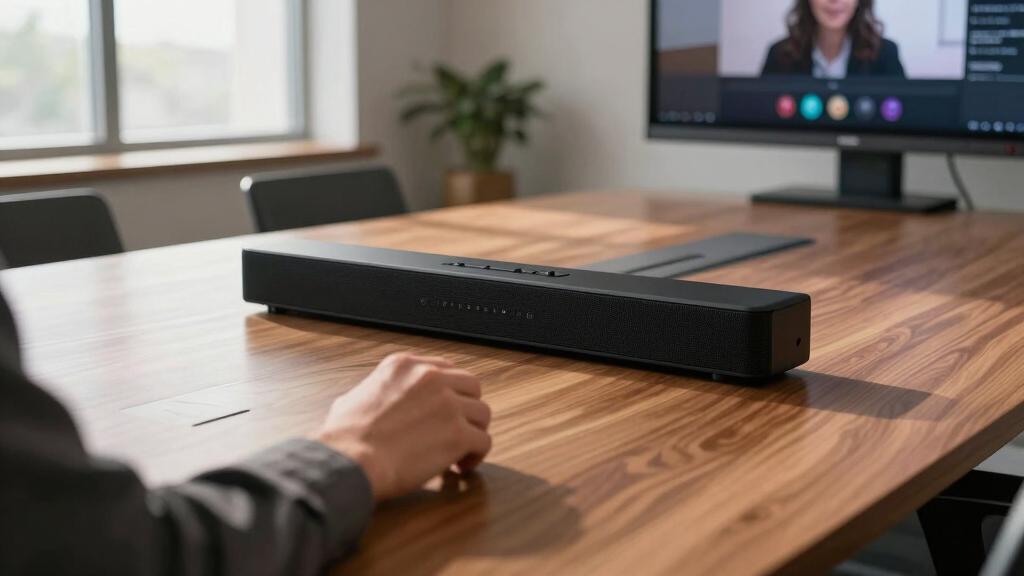
Finding the best meeting room soundbars for Zoom calls requires balancing audio clarity, ease of use, and compatibility with your space. The Bose Videobar VB1 stands out as the best overall choice for small to medium rooms thanks to its balanced sound and simple setup. For those on a budget, the Anker PowerConf offers impressive voice pickup without breaking the bank. If you need a premium, all-in-one solution, the Bose Professional VB-S combines high-fidelity audio with integrated video features. Most options trade off between sound quality, price, and portability—continue reading for a detailed breakdown to help you find the best fit for your meeting needs.

Get business pricing on office and shipping supplies
- Business-only prices and quantity discounts
- Tax-exempt purchasing
- Multiple users, one account, clear invoices
Key Takeaways
- Top-ranked products balance sound quality with ease of setup, making them suitable for diverse meeting environments.
- Microphone pickup range and noise reduction are critical for ensuring everyone is heard clearly during Zoom calls.
- Compatibility with common conferencing software like Zoom, Teams, and Google Meet significantly influences product usefulness.
- More expensive options often include integrated video features or advanced audio processing, but budget models can perform surprisingly well.
- Portability and size matter if your meeting space varies or if you need to move the soundbar between rooms.




More Details on Our Top Picks
Bose Videobar VB1- Video Soundbar for Home Office or Small Conference Rooms
The Bose Videobar VB1 stands out for combining high-quality audio and 4K video in an all-in-one package, making it ideal for small conference rooms or home offices. Its six beam-steering microphones actively focus on voices, unlike many competitors like the Yealink SP92, which rely on traditional mics. The integrated 4K camera with autoframing ensures clear visuals, adding a professional touch to remote meetings. Compared to the Bose VB-S, the VB1 offers more advanced video features but at a higher price. The setup is straightforward—plug and play via USB—perfect for users who want premium quality without complex installation. The main tradeoff is its cost; for those on tighter budgets, models like the Dell SP3022 might be more affordable but lack the video capabilities.
Pros:- All-in-one solution with 4K camera, mic array, and premium speakers
- Active beam-steering microphones that focus on voices and reject noise
- Simple USB plug-and-play setup
Cons:- Higher price point compared to basic soundbars or webcams
- Limited to small-to-medium room sizes, not suitable for larger spaces
Best for: Small teams or individuals who need a seamless, high-quality audiovisual experience for Zoom and other UC platforms.
Not ideal for: Large conference rooms or organizations requiring extensive microphone arrays or expandable systems, where scalability is essential.
- Audio Output Mode:Stereo
- Mounting Type:Wall Mount
- Speaker Size:2 Inches
- Connectivity:USB, Bluetooth
- Microphones:6 Beam-Steering Microphones
- Video Resolution:4K Ultra-HD
Bottom line: This is the best choice for users wanting top-tier audio and video integration in compact meeting environments.
Yealink Sp92 Conference Speaker and Microphone Teams Certified Mic with AI Noise Cancelling 20H Call Time USB Speakerphone for Small Meeting Room, Bluetooth Speaker for Computer/Laptop
The Yealink Sp92 excels in providing crystal-clear audio with AI noise cancellation, making it a strong contender for small meeting rooms. Its 360° omnidirectional microphone covers up to 13 feet, surpassing many basic speakers like the Dell SP3022, which lack full-room coverage. The 20-hour battery life and compact design make it ideal for remote or mobile setups, and it’s plug-and-play via USB-C or Bluetooth, ensuring quick deployment. Unlike the Bose VB1, the Yealink lacks an integrated camera, so it’s better suited to users who prioritize audio clarity over video. The tradeoff is its limited size and coverage, which might not work for larger rooms, and its price is slightly higher than simpler models like the computer soundbar.
Pros:- AI noise cancellation for clearer speech
- Long battery life of 20 hours
- Compact and portable for mobile use
Cons:- Lacks integrated video camera
- Coverage limited to small rooms, not suitable for larger spaces
Best for: Remote professionals or small teams seeking a portable, AI-powered microphone system for Zoom calls and quick setups.
Not ideal for: Large conference rooms or users needing integrated video capabilities, where a dedicated webcam or full AV system is preferable.
- Microphone Coverage:360°
- Battery Life:20 Hours
- Connectivity:USB-C, Bluetooth
- Wireless Technology:Bluetooth 5.3
- Dimensions:5″ x 5″ x 1.3″
- Weight:276g
Bottom line: Ideal for remote workers who need portable, AI-enhanced audio clarity for small meetings and Zoom calls.
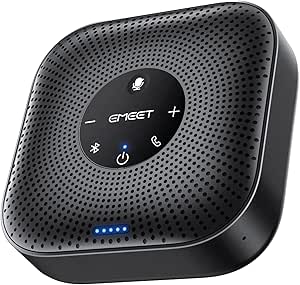
EMEET Conference Speakerphone M0 Plus, 4 AI Mics 360° Voice Pickup, Noise Reduction, USB C Speaker, Bluetooth Conference Speaker for 8 People w/Daisy Chain for 16
The EMEET M0 Plus offers impressive 360° voice pickup with four AI microphones, outperforming many basic models like the Dell SP3022 in sound quality and noise reduction. Its upgradeable design via daisy chaining allows expansion for rooms up to 16 participants, a feature not available in simpler speakers. The device supports both USB-C and Bluetooth, making it highly flexible and easy to deploy—no drivers needed. Its long 10-hour battery life exceeds most in its class, and the full duplex audio ensures natural conversations. Compared to the Bose VB-S, the EMEET M0 Plus is more versatile for larger small rooms but lacks integrated video, making it less suitable for video-centric setups. The main tradeoff is its focus on audio, so users needing camera features should look elsewhere.
Pros:- Expandable via daisy chaining for up to 16 participants
- AI noise reduction and echo cancellation
- Long 10-hour battery life
Cons:- No integrated webcam or video features
- Requires daisy chaining for larger rooms, adding complexity
Best for: Small to medium conference rooms that require expandable, AI-driven audio with easy connectivity and long battery life.
Not ideal for: Large conference spaces or users needing integrated video conferencing features, where dedicated webcams are necessary.
- Microphone Type:4 AI Microphones
- Battery Life:10 Hours
- Connectivity:USB-C, Bluetooth
- Wireless Range:10 Meters
- Daisy Chain Support:Yes
- Speaker Power:5 Watts
Bottom line: Best suited for medium-sized rooms needing scalable, AI-enhanced audio without video components.
Bose Professional VB-S, All-in-one Video Conference HD Camera, Noise-reducing Mic, and Hi-Fidelity Bluetooth Speaker for Home, Office, or Classroom
The Bose VB-S combines a 4K camera with a high-quality microphone array and Bluetooth speaker, making it ideal for professional environments where integrated AV is critical. Its 4K resolution and digital PTZ offer superior video clarity over the Bose VB1, and the noise-reducing mic array ensures clear audio, even in noisy rooms—outperforming models like the Bose VB1 in video quality. Its compact form factor allows for flexible mounting, including wall and table options. The device is designed for users who need a seamless, all-in-one conferencing solution with excellent audio and video. However, its price is higher, and it’s primarily suited for small to medium rooms. For large conference spaces, a more extensive AV system may be necessary.
Pros:- 4K Ultra-HD camera with digital PTZ
- Advanced noise-reducing microphones
- Compact, elegant design with flexible mounting options
Cons:- Higher cost compared to basic soundbars or webcams
- Limited to small or medium room sizes
Best for: Small to medium conference rooms or classrooms needing integrated 4K video with professional audio quality.
Not ideal for: Large rooms or enterprise environments where extensive AV infrastructure or multiple cameras are required.
- Video Resolution:4K UHD
- Microphone Type:Noise-Reducing Array
- Zoom:5x Digital
- Connectivity:Bluetooth, USB
- Camera Features:Digital PTZ, Auto-Framing
- Mounting Options:Tabletop, Wall
Bottom line: Ideal for environments requiring a high-quality, integrated AV system with excellent video and audio for Zoom and Teams.
Dell SP3022 USB Computer Speaker for PC, Laptop, Monitor, Business Conference-Mini Soundbar Speakerphone, AI Noise Echo Cancellation, Full Duplex Audio, 2 x 1.8W, MS-Teams Certified – Platinum Silver
The Dell SP3022 offers a compact, affordable option for clear audio during small meetings, outperforming simple computer speakers with its AI noise and echo cancellation. Its twin 1.8W speakers deliver decent sound, and full duplex audio supports natural multi-person conversations—ideal for basic Zoom calls. Unlike the Yealink or Bose systems, it lacks a dedicated microphone array or expandability but is simple to connect via USB-A or USB-C, making it very user-friendly. Its minimalist design fits well on a monitor or desk, but it doesn’t provide video or extensive coverage, limiting its use for larger or more complex setups. The main tradeoff is its basic feature set; for richer AV, a more integrated device is recommended.
Pros:- Compact and easy to connect via USB
- AI noise and echo cancellation for clearer calls
- MS-Teams certified
Cons:- Limited to small rooms or personal use
- No video or expandability options
Best for: Small offices or home users needing a straightforward, budget-friendly audio solution for Zoom and Teams meetings.
Not ideal for: Medium to large rooms or teams that require advanced noise cancellation, video, or microphone arrays, where more comprehensive systems are necessary.
- Power Output:2 x 1.8W
- Connectivity:USB-A, USB-C
- Noise Cancellation:AI Noise & Echo Reduction
- Full Duplex:Yes
- Mounting:Desk or Monitor
- MS Teams Certified:Yes
Bottom line: A practical choice for small-scale, budget-conscious meetings with decent audio clarity.
EMEET USB Speakerphone, M1A Zoom Certified AI Mics 360°Voice Pickup USB Type C-A Plug&Play Computer Speakers with Microphone, Fast Mute Noise Reduction Echo Cancellation for 5-8 People for Zoom Teams
This pick stands out for its Zoom certification and compatibility with a wide range of conferencing platforms, making it highly reliable for professional meetings. Its 360° voice pickup with AI noise reduction and echo cancellation ensures clear audio from all directions, surpassing many basic speakers like the Jabra Speak 510. The plug-and-play USB-C connection guarantees straightforward setup, and the two omnidirectional mics cover up to 8 people effectively. While its sound output is generally clear, the small form factor limits maximum volume compared to larger units, and it lacks Bluetooth, which might be inconvenient for some users. This model is ideal for medium-sized conference rooms where stability and certified quality matter most. It’s less suited for large, noisy environments or users needing wireless flexibility.
Pros:- Zoom certified for seamless platform compatibility
- 360° voice pickup with noise reduction
- Plug-and-play USB-C connection for easy setup
- Effective for 5-8 participants
Cons:- Limited maximum volume compared to larger models
- No Bluetooth connectivity
Best for: Professionals needing a reliable, certified speakerphone for hybrid or fully remote meetings in small to medium conference rooms.
Not ideal for: Users seeking wireless connectivity or larger-scale audio coverage in bigger rooms.
- Maximum Power:3 Watts
- Input Voltage:5 Volts
- Number of Microphones:2
- Connectivity:USB
- Microphone Coverage:360°
- Warranty:2 Years
Bottom line: This is a top choice for teams prioritizing certified, stable audio in small to medium meeting rooms.
Computer Speakers for Desktop PC Monitor, USB Plug-in, Wired, Computer Soundbar for PC, Laptop Speakers with Adaptive-Channel-Switching, Loud Sound, Deep Bass, USB C Adapter, Easy to Clip on Monitor
This model makes the list for its easy clip-on design and compatibility with USB-C devices, making it suitable for users new to conference speakers. Compared with the EMEET USB Speakerphone, it offers better user-friendliness and a compact form factor, though it lacks advanced AI noise reduction. Its deep bass and loud sound improve audio clarity for small meetings, and the adaptive channel switching ensures correct stereo positioning. However, it doesn’t include a microphone, limiting its use as a full conferencing solution, and the sound quality could be less refined than dedicated speakerphones. This pick is best for users who want a simple, space-saving speaker to enhance audio during meetings without complex features. It’s less ideal for larger rooms or high-noise environments where noise cancellation is critical.
Pros:- Simple clip-on monitor mounting
- Deep bass and loud volume
- Compatible with USB-C devices via built-in adapter
- Easy to operate with touch controls
Cons:- Lacks a built-in microphone for conferencing
- Basic audio quality without noise reduction features
Best for: Individuals or small teams seeking an easy, space-efficient audio upgrade for desktop use and casual meetings.
Not ideal for: Teams needing integrated microphones or advanced noise cancellation for noisy environments.
- Speaker Size:50mm
- Connectivity:USB, USB-C Adapter
- Mounting Type:Clamped to Monitor
- Sound Features:Deep Bass, Loud
- Compatibility:PC, Laptop
- Power Source:USB
Bottom line: Ideal for users who want straightforward, space-saving audio enhancement for small or casual meetings.
Conference Speaker and Microphone, 360° Omnidirectional USB Speakerphone Microphone with USB Hub, Noise Reduction/Echo Cancellation Computer Microphone for 8-10 People Business Conference, Home Office
This device earns its spot with its 360° omnidirectional microphone and integrated USB hub, making it perfect for conference rooms up to 10 people. Its noise reduction and echo cancellation create clearer audio compared to simpler speakerphones like the Yealink SP92. The built-in USB hub adds versatility, allowing users to connect multiple peripherals without clutter. Its plug-and-play design simplifies setup, but the bulkier size might be less suitable for tight spaces, and it doesn’t feature Bluetooth, limiting wireless flexibility. It’s an excellent choice for medium rooms with multiple participants who need integrated mic and device connectivity, but less ideal for smaller, single-user setups or environments requiring wireless use.
Pros:- Omnidirectional 360° microphone coverage
- Includes USB hub for connecting peripherals
- Noise reduction and echo cancellation
- Suitable for 8-10 participants
Cons:- Relatively bulky for small spaces
- No Bluetooth connectivity
Best for: Teams in small to medium meeting rooms needing a combined microphone, speaker, and USB hub for seamless connections.
Not ideal for: Users looking for wireless or portable solutions in smaller or highly mobile settings.
- Microphone Coverage:360°
- Connectivity:USB
- Speaker Size:50mm
- Noise Reduction:Yes
- Echo Cancellation:Yes
- Additional Features:Built-in USB Hub
Bottom line: Best suited for medium-sized conference rooms where multiple devices and high-quality audio are priorities.
Yealink SP92 USB Speakerphone Bluetooth Conference Speakers and Microphone Teams Certified Full-Duplex Noise Reduction 360° Audio Pickup for Small Meeting Room (NO DONGLE)
This choice excels for its full-duplex audio and 360° pickup, making it ideal for small meeting rooms where clarity from all participants is essential. Compared to the EMEET USB Speakerphone, the Yealink SP92 offers superior sound quality and noise reduction thanks to its advanced audio driver technology and certified compatibility with Teams. Its Bluetooth and wired options provide flexible connectivity, and it boasts a 20-hour battery life for extended meetings. A minor drawback is the absence of a dedicated mute button, relying instead on device controls, and it’s less suited for larger rooms due to its size. This product is best for small teams prioritizing high-quality audio in a compact, easy-to-use device.
Pros:- Full-duplex, 360° audio pickup
- Bluetooth and wired connectivity
- Noise reduction technology
- Long battery life of 20 hours
Cons:- No dedicated mute button
- Limited to small rooms
Best for: Small teams needing a certified, high-quality, portable speakerphone for intimate meeting spaces.
Not ideal for: Larger conference rooms or users seeking a dedicated microphone with extensive control features.
- Battery Life:20 hours
- Connectivity:Bluetooth, USB
- Microphone Type:360° omnidirectional
- Noise Reduction:Yes
- Full-Duplex:Yes
- Size:Compact
Bottom line: Perfect for small groups demanding high-fidelity audio with versatile connectivity options.
Jabra Speak 510 (2025 Edition) Portable, USB or Wireless Bluetooth Speaker for Meetings and Calls with Crystal-Clear Sound, Works with All Meeting Platforms – Microsoft Teams, Google Meet, Zoom, Black
This device makes the list for its wireless Bluetooth connectivity and compatibility with all major meeting platforms, offering unmatched flexibility for remote or mobile users. Its crystal-clear sound quality ensures professional audio during calls, and the setup is quick and simple, making it suitable for spontaneous meetings. Compared to the Yealink SP92, it sacrifices some advanced noise reduction features but gains portability and ease of use in any environment. The built-in microphone and up to 20 hours of battery life make it ideal for on-the-go professionals. Its main limitation is the smaller size, which might not be enough for larger groups or noisy environments. This is best for users needing robust wireless support and mobility in small to medium settings.
Pros:- Wireless Bluetooth and USB options
- Crystal-clear sound quality
- Long battery life of 20 hours
- Compatibility with all major platforms
Cons:- Less advanced noise reduction
- Smaller size limits microphone coverage
Best for: Remote professionals and small teams requiring flexible, wireless audio for meetings on the move.
Not ideal for: Teams in larger rooms or environments with high background noise needing advanced noise cancellation.
- Battery Life:20 hours
- Connectivity:Bluetooth, USB
- Microphone Type:Built-in
- Audio Quality:Crystal-clear
- Compatibility:All major platforms
- Wireless Range:30 meters
Bottom line: Ideal for mobile professionals or small teams seeking versatile, wireless conference audio solutions.
Anker PowerConf Speakerphone, Zoom Certified Conference Speaker with 6 Mics, 360° Enhanced Voice Pickup, 24H Call Time, Bluetooth 5.3, USB C, Compatible with Leading Platforms for Personal Workspaces
This option stands out for its combination of 360° voice pickup, AI noise reduction, and impressive battery life, making it a flexible choice for various meeting environments. Compared with the AIRHUG, the PowerConf offers a more robust microphone array and longer call time, which is ideal for extended sessions. Its wireless Bluetooth connectivity and USB-C compatibility simplify setup without sacrificing quality, but the tradeoff is that it’s slightly larger and less discreet than more compact models. Its AI deep learning capabilities ensure clear audio even in noisy rooms, which is essential for professional Zoom calls. While its size might be less ideal for ultra-compact spaces, the PowerConf’s all-around performance makes it suitable for small to medium conference rooms or dynamic home offices.
Pros:- Exceptional 360° voice pickup with 6 microphones
- Zoom certified with AI noise reduction for clear calls
- 24 hours of battery life supports long meetings
- Convenient Bluetooth and USB-C connectivity
Cons:- Larger footprint may be less suitable for tight spaces
- Premium price compared to simpler models
Best for: Small to medium teams needing a reliable, portable speakerphone with long battery life.
Not ideal for: Users seeking the smallest, most discreet device for very tight spaces or minimal desk setup.
- Microphone count:6
- Battery life:24 hours
- Connectivity:Bluetooth 5.3, USB-C
- Coverage:360°
- Compatibility:Zoom certified
- Dimensions:3.94 x 3.94 x 0.79 inches
- Weight:6 ounces
Bottom line: This is ideal for professionals who need a versatile, high-quality speakerphone that can handle longer meetings in small to medium rooms.
AIRHUG Conference Speaker and Microphone, Bluetooth Speakerphone with 360° Voice Pickup, Advanced Noise Reduction, USB-C Plug & Play, Compatible with Zoom and MS Team
This pick is distinguished by its ultra-portable design, effective noise reduction, and easy setup, making it a smart choice for smaller teams or remote work on the go. Compared with the Anker PowerConf, the AIRHUG offers a more compact form factor and dual connection options, which is perfect for quick setups or use in shared spaces. Its integrated AI noise cancellation and stereo sound quality deliver clear audio even in noisy environments, though it doesn’t match the microphone array size of the PowerConf for larger rooms. The built-in full-range 360° microphone captures voices within about 6 feet, making it suitable for small meetings of 4-6 people. However, its smaller size means it lacks the extended battery life of the PowerConf, so it’s less suited for all-day meetings but excellent for mobile or occasional use.
Pros:- Compact and highly portable design
- Effective AI noise reduction and stereo sound
- Dual Bluetooth and USB-C connection for easy device pairing
- Plug-and-play compatibility with major platforms
Cons:- Limited microphone coverage for larger groups
- Shorter battery life compared to bulkier models
Best for: Remote workers or small teams needing an affordable, portable speakerphone for quick meetings.
Not ideal for: Teams requiring long conference durations or meetings in larger rooms, where microphone coverage might fall short.
- Microphone coverage:6 ft
- Noise reduction:Yes
- Connectivity:Bluetooth, USB-C
- Maximum volume:85 dB
- Size:Pocket-sized
- Compatibility:Zoom, MS Teams, others
- Battery life:Not specified, suitable for short to moderate calls
Bottom line: This device is perfect for users who prioritize portability and ease of use over extensive coverage or battery life.
EMEET Conference Speaker and Microphone Luna 360° Voice Pickup w/Noise Reduction/Mute/Indicator USB Bluetooth Speakerphone w/Dongle for 8 People Daisy Chain for 16 Compatible with Leading Software
This model excels in larger conference settings thanks to its advanced VoiceIA noise reduction, 360° voice pickup, and daisy chaining feature, making it a strong choice for medium to big teams. Compared to the Anker PowerConf, Luna’s main advantage is its scalability; connecting multiple units allows for coverage of up to 16 attendees, ideal for bigger meetings. Its noise reduction and speech enhancement features significantly improve audio clarity in challenging environments. However, its wired daisy chain setup can be less convenient than wireless options and may require more initial configuration. While the maximum volume of 85 dB supports larger spaces, the device’s size and wired nature might be less appealing for mobile or very small setups. It’s best suited for conference rooms where scalability and audio quality are priorities.
Pros:- Supports daisy chaining for scalability
- Advanced noise reduction with VoiceIA technology
- 360° voice pickup with three microphone arrays
- Compatible with all leading conferencing platforms
Cons:- Requires additional cabling for daisy chaining
- Less portable due to wired setup
Best for: Medium to large conference rooms needing scalable audio solutions for up to 16 participants.
Not ideal for: Small teams or users seeking a lightweight, wireless device for personal or small-space use.
- Microphone arrays:3
- Maximum volume:85 dB
- Noise reduction:VoiceIA
- Daisy chain capability:Yes
- Compatibility:Zoom, MS Teams, WebEx, etc.
- Connection type:USB, Bluetooth, AUX
- Coverage:360°
Bottom line: This is ideal for larger meetings where expanding audio coverage with multiple units is necessary, and wired stability is valued.

How We Picked
In selecting the best meeting room soundbars for Zoom calls, I focused on several core criteria that matter to buyers. Performance included audio clarity, microphone range, and noise reduction capabilities, which directly impact call quality. Usability considerations such as setup complexity, compatibility with conferencing platforms, and ease of operation also played a role. Build quality and durability were assessed to ensure long-term reliability, while value considered price relative to features offered. Products were ranked based on how well they balanced these factors, prioritizing models that deliver professional-grade audio in typical meeting room sizes while remaining user-friendly and cost-effective.Factors to Consider When Choosing Best Meeting Room Soundbars For Zoom Calls
Choosing the right soundbar for Zoom meetings involves more than just sound quality. The size of your room, the number of participants, and your budget all influence which product makes the most sense. Additionally, features like microphone range, noise cancellation, and platform compatibility can dramatically improve or hinder your experience. Understanding these factors can help you avoid common pitfalls, such as underestimating room size or selecting a device that’s incompatible with your software. This guide outlines key considerations to help you make an informed decision that enhances your virtual meetings.Room Size and Microphone Range
Assessing your room size is essential when selecting a soundbar. For small rooms or huddle spaces, a compact model with a 3-5 meter microphone pickup range may suffice. Larger conference rooms, however, require devices with extended pickup ranges and multiple microphones to ensure everyone’s voice is captured clearly. Opting for a model with adjustable microphone sensitivity can also prevent background noise from overwhelming calls. Remember, a mismatch between room size and device capability leads to poor audio quality and frustrated participants.
Compatibility and Connectivity
Most conference soundbars connect via USB or Bluetooth, but not all are universally compatible with every platform. Double-check that the device supports Zoom, Microsoft Teams, or your preferred software natively or through plug-ins. Wired connections tend to be more reliable and straightforward, especially in professional settings, but wireless options offer flexibility and easier repositioning. Consider whether your meeting space has the necessary ports and whether the device supports your existing hardware to avoid frustrating setup issues.
Audio Quality and Noise Cancellation
Clear, intelligible audio depends heavily on quality microphones and noise reduction features. Look for models with multiple beamforming microphones or 360-degree pickup to capture voices from all directions. Noise suppression technology helps reduce background hum, chatter, and room echo, which can otherwise distract or obscure speech. However, higher-end noise cancellation may introduce latency or require more processing power, so balance these features with your real-world needs and budget.
Ease of Use and Setup
Simpler is often better, especially if your team isn’t technically inclined. Devices with plug-and-play USB connectivity and straightforward controls reduce setup time and minimize user error. Features like automatic mute, touch controls, or dedicated remote controls enhance usability during busy meetings. Avoid overly complex setups with proprietary software or multiple components unless your team is comfortable with more advanced configurations. Remember, a user-friendly device encourages consistent use and better meeting experiences.
Price and Value
While premium models offer advanced features like integrated cameras and high-fidelity audio, they come at a higher cost. Budget options can still deliver solid performance if you choose models with good microphone range and noise reduction. Consider your actual needs versus the features offered—paying more for extras you won’t use isn’t smart. Conversely, investing in a higher-priced device might be worthwhile if your meetings are frequent or involve large teams, as it can significantly improve call quality and professionalism.
Frequently Asked Questions
How do I choose a soundbar that works well for a large conference room?
For larger rooms, prioritize a soundbar with an extended microphone pickup range, multiple microphones, and noise cancellation. Look for models specifically designed for conference rooms, which often include multiple beamforming mics that can capture voices from across the space. Compatibility with your conferencing platform and ease of connection are also vital to avoid setup headaches. Remember that larger rooms may also benefit from additional audio equipment, such as supplementary microphones or speakers, to ensure everyone is heard clearly.
Is it better to opt for a wireless or wired soundbar for Zoom calls?
Wired soundbars generally provide more reliable and consistent audio quality, especially in environments with potential wireless interference. They are typically easier to set up and less prone to disconnection issues. Wireless models, however, offer more flexibility in placement and can reduce clutter, which is beneficial in dynamic or multi-use spaces. Your choice depends on your room setup, existing infrastructure, and whether you prioritize stability over convenience.
What features should I look for in a budget-friendly meeting room soundbar?
In budget options, focus on essential features like good microphone pickup, noise reduction, and compatibility with Zoom or other platforms. Ensure the device has a straightforward USB connection for easy setup. Basic controls and mute functions are helpful for managing calls efficiently. While high-end audio processing may be limited, many affordable models still deliver clear sound and decent microphone coverage suitable for small to medium rooms.
Can I use a regular Bluetooth speaker as a meeting room soundbar?
While a Bluetooth speaker might handle audio playback, it’s generally not ideal for meetings because Bluetooth microphones and speakers often lack the necessary microphone pickup range and noise cancellation features. They may also introduce latency or connection stability issues during calls. For professional-quality audio, dedicated conference soundbars with multiple microphones and platform compatibility are a better choice, especially in a formal or large meeting setting.
How important is microphone pickup range for Zoom meetings?
Microphone pickup range is one of the most critical factors for clear communication. If the range is too short, voices from participants at the far end of the room may not be captured well, leading to frustration and misunderstanding. A suitable pickup range depends on room size: smaller spaces need less, while larger rooms require models with extended range and multiple microphones. Ensuring the microphone can cover your entire meeting area is key to effective virtual communication.
Conclusion
For the typical small to medium conference room, The Bose Videobar VB1 offers a balanced blend of audio quality, ease of use, and compatibility, making it ideal for most professional settings. Budget-conscious teams will find the Anker PowerConf delivers surprisingly good performance at a lower cost, perfect for less frequent or smaller meetings. Those seeking a comprehensive, premium solution with integrated video and high-fidelity audio should consider the Bose Professional VB-S. For new users or casual environments, simple plug-and-play models like the Jabra Speak 510 are straightforward and effective. Ultimately, your choice hinges on room size, call frequency, and budget—match these factors carefully to find the best meeting room soundbar for your Zoom calls in 2026. As an affiliate, we earn on qualifying purchases.Fall Picks
fall essentials