
Finding the right mesh WiFi system for an office environment involves balancing coverage, speed, and ease of management. The TP-Link Deco X55 AX3000 stands out as the best overall choice, offering robust performance and reliable coverage for small to medium offices. The Deco 7 Pro Tri-Band WiFi 7 provides cutting-edge WiFi 7 technology for high-density environments, while the eero 6 Mesh WiFi System offers straightforward setup ideal for smaller teams or less complex setups. Each option presents tradeoffs—whether in price, setup complexity, or scalability—that impact suitability for different office sizes and needs. Continue reading for a detailed breakdown of each system’s strengths and weaknesses.

Get business pricing on office and shipping supplies
- Business-only prices and quantity discounts
- Tax-exempt purchasing
- Multiple users, one account, clear invoices
Key Takeaways
- Coverage area varies significantly; larger offices benefit from multi-pack systems with high throughput.
- WiFi 7 systems like Deco 7 Pro provide future-proof speed but come at a premium and with increased complexity.
- Ease of setup and management is better with brands like eero and Google WiFi, especially for smaller teams.
- Ethernet backhaul support improves stability and speed, crucial in high-demand office environments.
- Price-to-performance ratio differs: premium systems deliver top speed but may be unnecessary for smaller or less demanding offices.
| TP-Link Deco X55 AX3000 WiFi 6 Mesh System – Covers up to 2500 Sq.Ft., 3 Gigabit Ports, Supports Ethernet Backhaul, 1-Pack | 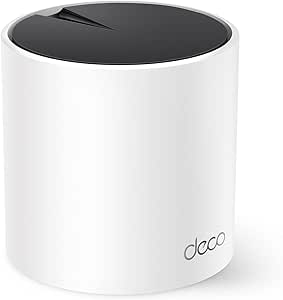 | Best Overall for Mid-Size Offices | WiFi Standard: WiFi 6 (AX3000) | Coverage Area: 2500 sq.ft. | Number of Ports: 3 Gigabit Ethernet ports | VIEW ON AMAZON | See Our Full Breakdown |
| Deco 7 Pro Tri-Band WiFi 7 BE10000 Whole Home Mesh System 3-Pack |  | Best for Large, High-Performance Offices | Coverage: 7,600 sq.ft. | Wi-Fi Speed: up to 5,188 Mbps (6 GHz), 4,324 Mbps (5 GHz), 574 Mbps (2.4 GHz) | Number of Units: 3-pack | VIEW ON AMAZON | See Our Full Breakdown |
| TP-Link Deco S4 2-Pack Whole Home Mesh WiFi System |  | Best Budget-Friendly Choice for Small Offices | Coverage: 3,800 sq.ft. | WiFi Standard: AC1900 | Number of Units: 2 | VIEW ON AMAZON | See Our Full Breakdown |
| TP-Link Deco X15 Dual-Band AX1500 WiFi 6 Mesh Wi-Fi System, 3-Pack |  | Best for Large, Cost-Conscious Offices | Wi-Fi Standard: WiFi 6 (AX1500) | Coverage: up to 5,600 sq.ft. | Number of Units: 3 | VIEW ON AMAZON | See Our Full Breakdown |
| eero 6 Mesh WiFi System – 3 Pack (1 Router + 2 Extenders) |  | Best for Small to Medium Offices with Smart Home Integration | Coverage: 4,500 sq ft | Supports internet speeds: up to 500 Mbps | Number of devices supported: 75+ | VIEW ON AMAZON | See Our Full Breakdown |
| Google WiFi Mesh Router System for Home and Office – 2 Pack |  | Best Budget-Friendly for Small to Medium Offices | Coverage: 3,800 sq ft | Technology: Wi-Fi 5 (802.11ac) | Speed: up to 2.2 Gbps | VIEW ON AMAZON | See Our Full Breakdown |
| TP-Link Deco XE75 AXE5400 Tri-Band WiFi 6E Mesh System (3-Pack) |  | Best for Large, Tech-Savvy Offices Needing WiFi 6E | Coverage: 7,200 sq ft | WiFi Bands: Tri-Band (6 GHz, 5 GHz, 2.4 GHz) | Total Speed: 5,400 Mbps | VIEW ON AMAZON | See Our Full Breakdown |
| TP-Link Deco X55 AX3000 WiFi 6 Mesh System (3-Pack) |  | Best for Medium to Large Offices Wanting WiFi 6 | Wi-Fi Standard: Wi-Fi 6 (AX3000) | Coverage: 6,500 sq ft | Number of Units: 3 | VIEW ON AMAZON | See Our Full Breakdown |
| TP-Link Deco S4 Mesh AC1900 WiFi System (3-Pack) |  | Best for Cost-Conscious Offices Needing Decent Performance | Coverage: 5,500 sq ft | WiFi Speed: AC1900 | Number of Units: 3 | VIEW ON AMAZON | See Our Full Breakdown |
| Deco 7 Dual-Band WiFi 7 Mesh System 4-Stream 5 Gbps, 240 MHz, Up to 6,600 Sq.Ft, 2x 2.5G Ports, VPN, MLO, AI-Roaming, HomeShield, 3-Pack |  | Best for Large, High-Performance Offices with Advanced Needs | Wi-Fi Standard: WiFi 7 | Speed: Up to 5 Gbps | Coverage: 6,600 sq ft | VIEW ON AMAZON | See Our Full Breakdown |
| mesh wifi systems for office | Coverage | Number of Units |
|---|---|---|
| TP-Link Deco X55 AX3000 WiFi 6 | — | — |
| Deco 7 Pro Tri-Band WiFi 7 BE1 | 7,600 sq.ft. | 3-pack |
| TP-Link Deco S4 2-Pack Whole H | 3,800 sq.ft. | 2 |
| TP-Link Deco X15 Dual-Band AX1 | up to 5,600 sq.ft. | 3 |
| eero 6 Mesh WiFi System | 4,500 sq ft | — |
| Google WiFi Mesh Router System | 3,800 sq ft | 2 |
| TP-Link Deco XE75 AXE5400 Tri- | 7,200 sq ft | 3 |
| TP-Link Deco X55 AX3000 WiFi 6 | 6,500 sq ft | 3 |
| TP-Link Deco S4 Mesh AC1900 Wi | 5,500 sq ft | 3 |
| Deco 7 Dual-Band WiFi 7 Mesh S | 6,600 sq ft | — |
More Details on Our Top Picks
TP-Link Deco X55 AX3000 WiFi 6 Mesh System – Covers up to 2500 Sq.Ft., 3 Gigabit Ports, Supports Ethernet Backhaul, 1-Pack
The Deco X55 AX3000 stands out for offering a reliable balance of speed, coverage, and security for small to medium office spaces. Compared with the eero 6, its support for WiFi 6 translates into faster speeds and better handling of multiple devices, which is essential in office environments. While its coverage is limited to 2500 sq.ft. per unit, adding multiple units can extend coverage, making it flexible for different office sizes. Its easy setup via the Deco app and built-in security with TP-Link HomeShield make it suitable for non-technical users prioritizing security. However, it requires a modem for most ISPs, and coverage per unit may fall short for larger offices unless additional units are deployed. This pick makes the most sense for small to medium offices needing reliable WiFi with security features without the complexity of WiFi 7 or higher-end solutions.
Pros:- Supports WiFi 6 for faster speeds and better device handling
- Easy setup with the Deco app
- Supports Ethernet backhaul for network stability
- Includes advanced security features with HomeShield
Cons:- Coverage limited to 2500 sq.ft. per unit, possibly requiring multiple units
- Requires a separate modem for most internet providers
Best for: Small to medium-sized offices seeking reliable WiFi 6 coverage with security features and simple setup.
Not ideal for: Very large offices or enterprise environments requiring extensive coverage beyond 2500 sq.ft. per unit or advanced wired backhaul options.
- WiFi Standard:WiFi 6 (AX3000)
- Coverage Area:2500 sq.ft.
- Number of Ports:3 Gigabit Ethernet ports
- Mesh System:Yes
- Supports Ethernet Backhaul:Yes
- App Control:Yes
- Security:TP-Link HomeShield
Our verdict“This system is ideal for smaller offices looking for reliable, secure WiFi with straightforward management.”
Deco 7 Pro Tri-Band WiFi 7 BE10000 Whole Home Mesh System 3-Pack
The Deco 7 Pro Tri-Band WiFi 7 system is designed for expansive office environments that demand ultra-fast, stable connections with support for over 200 devices. Its wide coverage of up to 7,600 sq.ft. surpasses most alternatives like the Deco X15, making it ideal for large teams or multiple office floors. The tri-band WiFi 7 technology provides high throughput, essential for demanding applications like video conferencing and large data transfers. Its support for wired backhaul, AI-driven roaming, and robust security features make it a premium option, though setup may be complex for non-technical users, and the price is significantly higher. It requires a separate modem, similar to other high-end systems. This makes the Deco 7 Pro best suited for large, high-density offices where top-tier performance and coverage are critical.
Pros:- Extensive coverage up to 7,600 sq.ft.
- Supports over 200 devices with stable performance
- Fast WiFi 7 speeds for demanding tasks
- Advanced security and AI-driven roaming
Cons:- Requires a separate modem for internet connection
- High price point may be prohibitive for smaller offices
- Complex setup not ideal for non-technical users
Best for: Large offices or enterprises needing extensive coverage, high device capacity, and cutting-edge WiFi 7 speeds.
Not ideal for: Small or budget-conscious offices, due to its high cost and complex setup requirements.
- Coverage:7,600 sq.ft.
- Wi-Fi Speed:up to 5,188 Mbps (6 GHz), 4,324 Mbps (5 GHz), 574 Mbps (2.4 GHz)
- Number of Units:3-pack
- Number of Devices Supported:over 200
- Ports:4 x 2.5G WAN/LAN, 1 x USB 3.0
- Backhaul:Wired and wireless Tri-Band Wi-Fi 7
- Security:TP-Link HomeShield, VPN support
Our verdict“This system is best for large, high-density offices that need maximum coverage and high performance without budget constraints.”
TP-Link Deco S4 2-Pack Whole Home Mesh WiFi System
The Deco S4 2-Pack offers a straightforward solution for small offices requiring reliable WiFi coverage. Its AC1900 speeds and coverage of up to 3,800 sq.ft. make it comparable to the Deco X55, but at a lower cost, making it attractive for budget-conscious buyers. The setup is quick and simple via the mobile app, and its support for wired Ethernet backhaul enhances network stability. While it handles up to 75 devices, larger or more device-heavy offices might find its capacity limiting. It doesn’t include a built-in modem, so users need to pair it with their existing internet setup. Overall, this system delivers decent performance for small offices without the high price tag of WiFi 6E or WiFi 7 models.
Pros:- Easy setup through mobile app
- Supports wired Ethernet backhaul
- Strong coverage of 3,800 sq.ft.
- Parental controls and Alexa integration
Cons:- Limited to 2 units, restricting expandability
- No built-in modem, needs existing internet setup
Best for: Small offices or startups needing reliable WiFi coverage on a budget.
Not ideal for: Large offices or those with many devices, due to limited capacity and coverage.
- Coverage:3,800 sq.ft.
- WiFi Standard:AC1900
- Number of Units:2
- Ethernet Ports:4 (2 per unit)
- Supported Devices:up to 75
- Parental Controls:Yes
Our verdict“This system suits small offices seeking an affordable, reliable WiFi mesh solution with decent coverage.”
TP-Link Deco X15 Dual-Band AX1500 WiFi 6 Mesh Wi-Fi System, 3-Pack
The Deco X15 offers a compelling mix of coverage and performance for larger offices on a budget. Its support for WiFi 6 and coverage up to 5,600 sq.ft. makes it comparable to the Deco X55, but at a lower price point, making it attractive for organizations needing broad coverage without the premium cost. Its dual-band setup supports up to 120 devices, suitable for busy workspaces. The inclusion of wired Ethernet backhaul helps maintain speed and stability, while easy management through the Deco app simplifies deployment. However, it doesn’t match the WiFi 6 capabilities of the AX3000 system, and some features might require a subscription to TP-Link HomeShield. This makes the Deco X15 a practical choice for larger offices seeking affordable, reliable WiFi coverage.
Pros:- Supports WiFi 6 for future-proofing
- Coverage up to 5,600 sq.ft.
- Supports up to 120 devices
- Supports wired Ethernet backhaul
Cons:- Limited to dual-band WiFi 6, not WiFi 6E or 7
- Some features may require additional subscription
Best for: Large offices or small enterprises requiring extensive coverage with budget considerations.
Not ideal for: Offices needing the latest WiFi 6E or WiFi 7 performance or very high throughput for demanding applications.
- Wi-Fi Standard:WiFi 6 (AX1500)
- Coverage:up to 5,600 sq.ft.
- Number of Units:3
- Ethernet Ports per Unit:2 Gigabit
- Supports Ethernet Backhaul:Yes
- Device Compatibility:up to 120 devices
Our verdict“This system is well-suited for large offices that want broad coverage with good performance at a reasonable price.”
eero 6 Mesh WiFi System – 3 Pack (1 Router + 2 Extenders)
The eero 6 system provides reliable coverage up to 4,500 sq.ft., making it suitable for small to medium office setups. Its support for Wi-Fi 6 ensures smooth handling of multiple devices, comparable to the Deco X55 but with a simplified setup process through the app. The added benefit of Zigbee smart home hub functionality makes it appealing for offices with smart devices or integrated IoT setups. Its automatic updates and security features keep the network protected without manual intervention. However, the system is limited to internet plans up to 500 Mbps, which may be a bottleneck for high-speed needs, and the price is not specified, potentially making it less attractive for tight budgets. This pick is ideal for offices integrating smart home or IoT devices along with standard WiFi needs.
Pros:- Provides extensive coverage up to 4,500 sq.ft.
- Supports over 75 devices with Wi-Fi 6
- Includes Zigbee smart home hub functionality
- Easy setup and management via the app
Cons:- Limited to internet plans up to 500 Mbps
- Price not specified could impact value perception
Best for: Small to medium offices with smart home or IoT device integration requiring reliable WiFi and easy management.
Not ideal for: Offices with internet plans exceeding 500 Mbps or those needing enterprise-grade security and custom configurations.
- Coverage:4,500 sq ft
- Supports internet speeds:up to 500 Mbps
- Number of devices supported:75+
- Package includes:1 router + 2 extenders
- Technology:Wi-Fi 6
- Smart home hub:Yes (Zigbee)
Our verdict“This system is best for small to medium offices seeking simple yet reliable WiFi with smart home integration features.”
Google WiFi Mesh Router System for Home and Office – 2 Pack
This Google WiFi system stands out for its straightforward setup and reliable coverage, making it ideal for small to medium office spaces up to 3,800 square feet. Compared to the TP-Link Deco S4, it offers easier expansion without complex configuration, but it relies on Wi-Fi 5, which may limit future-proofing as Wi-Fi 6 becomes more standard. Its high-speed capacity supports multiple devices, yet it requires a compatible modem to achieve optimal performance. This pick is perfect for offices prioritizing simplicity and cost-effectiveness over cutting-edge tech.
Pros:- Easy to set up and expand
- Provides reliable, whole-office Wi-Fi coverage
- Supports high-speed internet for multiple devices
Cons:- Limited to Wi-Fi 5 technology, not Wi-Fi 6
- Requires compatible modem for best performance
Best for: Small to medium office environments where ease of setup and affordability are key
Not ideal for: Large offices or those planning to upgrade to Wi-Fi 6 or Wi-Fi 6E in the near future
- Coverage:3,800 sq ft
- Technology:Wi-Fi 5 (802.11ac)
- Speed:up to 2.2 Gbps
- Number of Units:2
Our verdict“This system suits smaller offices or those looking for straightforward, budget-friendly Wi-Fi coverage without the latest tech.”
TP-Link Deco XE75 AXE5400 Tri-Band WiFi 6E Mesh System (3-Pack)
The TP-Link Deco XE75 excels with its expansive coverage of up to 7,200 sq.ft and the inclusion of WiFi 6E, providing faster speeds and less congestion, especially beneficial in busy office environments. Its tri-band setup with a dedicated 6 GHz band outperforms the dual-band Deco 7 in speed and device capacity, making it ideal for dense networks. The AI-driven mesh technology simplifies management, but its high price and the need for a compatible modem may be a barrier for some small offices. Compared with older models, this offers a significant leap in speed and capacity for future-proofing.
Pros:- Provides extensive coverage up to 7,200 sq.ft
- Includes WiFi 6E with a dedicated 6 GHz band
- Easy to set up and manage via the Deco app
- Built-in security with TP-Link HomeShield
Cons:- Requires a modem for most ISPs
- Premium security features may require a subscription
Best for: Large offices or tech-focused environments with many connected devices and need for high performance
Not ideal for: Small offices or organizations with limited budgets that don’t require WiFi 6E features
- Coverage:7,200 sq ft
- WiFi Bands:Tri-Band (6 GHz, 5 GHz, 2.4 GHz)
- Total Speed:5,400 Mbps
- Number of Units:3
Our verdict“Ideal for large, tech-forward offices seeking future-proof, high-speed WiFi with robust security features.”
TP-Link Deco X55 AX3000 WiFi 6 Mesh System (3-Pack)
The Deco X55 offers a solid balance of coverage—up to 6,500 sq.ft—and Wi-Fi 6 technology, making it suitable for offices with many devices. Its three-unit setup with multiple Ethernet ports supports wired backhaul, which can improve stability compared to wireless-only systems like the Deco S4. While it’s more capable than Wi-Fi 5 systems, it doesn’t match the cutting-edge speeds of WiFi 7, and the price may be a concern for cost-sensitive setups. For organizations seeking reliable Wi-Fi 6, this provides a noticeable upgrade over older models like the Deco S4 without the complexity of Wi-Fi 6E.
Pros:- Supports up to 150 devices
- Supports Ethernet backhaul for improved performance
- Easy setup and management via Deco app
- Provides coverage up to 6,500 sq ft
Cons:- Requires a modem for internet access
- Price might be high for minimal needs
Best for: Medium to large offices that need reliable WiFi 6 with extensive coverage and Ethernet support
Not ideal for: Small offices or those on tight budgets needing only basic Wi-Fi coverage
- Wi-Fi Standard:Wi-Fi 6 (AX3000)
- Coverage:6,500 sq ft
- Number of Units:3
- Ethernet Ports per Unit:3
Our verdict“This system makes the most sense for offices demanding reliable Wi-Fi 6 with wired connectivity options.”
TP-Link Deco S4 Mesh AC1900 WiFi System (3-Pack)
The Deco S4 offers a balance of affordability and coverage, providing up to 5,500 sq.ft. for small to medium offices. Its AC1900 speeds are sufficient for basic office tasks but fall behind newer Wi-Fi 6 and Wi-Fi 7 systems, which can support more devices at higher speeds. Compared to the Deco X55, it’s less future-proof and may struggle in high-demand environments. Its straightforward setup and parental controls add value, but it’s better suited for less complex office needs where budget is a priority.
Pros:- Affordable price point
- Easy to set up and use
- Supports multiple devices with stable AC1900 speeds
- Good coverage for small to medium spaces
Cons:- No advanced security features beyond parental controls
- Limited future-proofing compared to Wi-Fi 6 or Wi-Fi 7
Best for: Small to medium offices with modest device counts and limited budgets
Not ideal for: Large, device-heavy offices or those needing the latest Wi-Fi standards
- Coverage:5,500 sq ft
- WiFi Speed:AC1900
- Number of Units:3
- Ethernet Ports per Unit:2
Our verdict“This system fits small offices on a budget needing reliable Wi-Fi coverage without advanced features.”
Deco 7 Dual-Band WiFi 7 Mesh System 4-Stream 5 Gbps, 240 MHz, Up to 6,600 Sq.Ft, 2x 2.5G Ports, VPN, MLO, AI-Roaming, HomeShield, 3-Pack
The Deco 7 Mesh System with WiFi 7 technology pushes the boundaries of speed and coverage, supporting over 150 devices across up to 6,600 sq.ft. This model offers multi-link operation (MLO), 4K-QAM, and 240 MHz channels, delivering speeds up to 5 Gbps—ideal for high-demand offices with streaming, gaming, or smart device integration. Its AI-Roaming and security features like HomeShield make it a comprehensive choice for large, tech-dependent workplaces. Compared with WiFi 6E systems, it provides even faster speeds and more capacity, but its complexity and higher price may be unnecessary for smaller setups. It’s a future-proof choice for highly connected offices.
Pros:- Supports speeds up to 5 Gbps
- Extensive coverage up to 6,600 sq ft
- Supports over 150 devices
- Includes advanced security and management features
Cons:- Requires a separate modem
- Complex setup for non-technical users
- Higher price point than Wi-Fi 6 systems
Best for: Large offices with high bandwidth requirements and numerous connected devices
Not ideal for: Small offices or organizations with limited budgets that don’t need WiFi 7’s advanced features
- Wi-Fi Standard:WiFi 7
- Speed:Up to 5 Gbps
- Coverage:6,600 sq ft
- Number of Devices Supported:Over 150
Our verdict“This system is best suited for large, tech-intensive offices seeking cutting-edge Wi-Fi 7 performance and capacity.”

How We Picked
I evaluated these mesh WiFi systems based on performance in office-like environments, including coverage range, speed, and reliability. Ease of installation and ongoing management features were key factors, particularly for office IT teams and non-technical users. Build quality and scalability also played a role, ensuring the systems could handle future growth or increased device density. Additionally, I considered value—how much performance you get for the price—along with support for wired backhaul and advanced features like WiFi 6E or WiFi 7. The ranking reflects a balance of these factors, prioritizing systems that meet the demands of typical office settings while offering flexibility and ease of use.Factors to Consider When Choosing Mesh Wifi Systems For Offices
Choosing the right mesh WiFi system for an office involves more than just looking at coverage and speed. Several factors influence how well a system will perform and how easily it integrates into your workspace. Considering these aspects can help prevent costly missteps and ensure your WiFi supports your business operations reliably and efficiently.Coverage and Scalability
Assess your office size and layout before choosing a system. Larger spaces or offices with complex layouts benefit from systems that support multiple nodes and Ethernet backhaul options. Avoid systems with limited range if you plan to expand or have multiple floors. Scalability ensures your network can grow with your business without requiring a complete overhaul.
Speed and Technology
Look for systems supporting the latest WiFi standards like WiFi 6 or WiFi 7 for future-proof performance. These standards handle multiple devices better and deliver higher speeds essential for video conferencing, cloud applications, and large file transfers. Keep in mind that higher speeds often come with a higher price tag, so balance your current needs with future demands.
Ease of Setup and Management
For office environments, especially those without dedicated IT staff, systems with simple app-based setup and management are advantageous. Features like remote management, guest networks, and easy firmware updates help keep the network secure and manageable. Avoid overly complex systems if quick deployment or minimal maintenance is a priority.
Wired Backhaul and Reliability
Ethernet backhaul support can significantly improve stability and throughput, especially in dense office environments with many connected devices. If your office has wired infrastructure, choose a system that leverages it to enhance performance. Without wired backhaul, wireless interference can cause performance dips during peak usage times.
Budget and Value
While premium systems offer advanced features and higher speeds, they come at a premium price. Evaluate your actual needs—if your office only requires basic internet access, a mid-range system might suffice. For high-demand environments, investing in higher-tier options can prevent bottlenecks and future upgrades, leading to better long-term value.
Frequently Asked Questions
Can a mesh WiFi system handle heavy data transfer in an office?
Yes, many modern mesh WiFi systems support high data transfer rates suitable for office environments, especially those with WiFi 6 or WiFi 7 technologies. These systems can manage multiple devices simultaneously, reducing congestion and maintaining fast speeds even during peak usage. However, actual performance depends on the specific hardware, network setup, and internet connection speed.
Is it worth investing in WiFi 7 mesh systems for my small office?
WiFi 7 offers higher speeds, lower latency, and better device handling, making it appealing for future-proofing. If your office requires high bandwidth for activities like large file transfers, video conferencing, or cloud-based applications, investing in WiFi 7 can be worthwhile. For smaller offices with basic needs, WiFi 6 systems may provide sufficient performance at a lower cost.
How important is Ethernet backhaul in an office mesh network?
Ethernet backhaul can dramatically improve network stability and speed by reducing wireless interference. This feature is especially valuable in larger offices or environments with many connected devices, where wireless backhaul might cause congestion. If your office has wired Ethernet infrastructure, choosing a system that supports wired backhaul is a smart move for consistent performance.
Are mesh WiFi systems secure enough for sensitive office data?
Most modern mesh WiFi systems come with built-in security features like WPA3 encryption, guest networks, and automatic firmware updates. These measures help protect sensitive data and prevent unauthorized access. For highly sensitive environments, consider systems with additional security layers or enterprise-grade management features, and always keep firmware updated to patch vulnerabilities.
What should I prioritize when choosing between a 2-pack and a 3-pack system?
Choosing between a 2-pack and a 3-pack depends on your office size and layout. A 3-pack typically covers larger or multi-floor offices more reliably, providing better coverage and capacity. However, a 2-pack may be sufficient for smaller or open-plan spaces. Consider your current needs and potential future expansion when selecting the right pack size to avoid under- or over-investing.
Conclusion
For small offices or those just starting out, systems like the eero 6 Mesh WiFi System offer straightforward setup and reliable coverage. Larger or more demanding environments benefit from high-performance options like the Deco X55 AX3000 or the Deco 7 Pro WiFi 7, which provide scalability and future-proof features. Budget-conscious buyers should focus on value-packed options like the Deco S4 series, while tech-savvy users aiming for maximum speed might opt for WiFi 7 systems. Ultimately, matching the system to your office size, technical needs, and budget ensures a smoother experience and more reliable connectivity.
Fall Picks
fall essentials
As an affiliate, we earn on qualifying purchases.