

Get business pricing on office and shipping supplies
- Business-only prices and quantity discounts
- Tax-exempt purchasing
- Multiple users, one account, clear invoices
Key Takeaways
- The top-ranked HP OfficeJet Pro models excel in speed, print quality, and multifunction versatility, making them ideal for busy home offices.
- Budget-friendly options like the HP DeskJet 2955 still deliver decent performance but often lack advanced features like automatic duplexing or high-volume capacity.
- Wireless connectivity and smart features are common in higher-tier models, significantly enhancing ease of use and integration with home workflows.
- All-in-one functionality is standard, but the quality of scanning and copying features varies, influencing which model is best for document-heavy tasks.
- Price differences among these models reflect differences in print volume capacity, feature sets, and build quality—spend more if you need frequent, high-volume printing.
| HP OfficeJet Pro 8135 Wireless All-in-One Color Inkjet Printer |  | Best Overall for Versatile Home Office Use | Print Speed: up to 20 ppm black, 10 ppm color | Input Tray Capacity: 225 sheets | Touchscreen: 2.7-inch color touchscreen | VIEW ON AMAZON | See Our Full Breakdown |
| HP OfficeJet Pro 9135 Wireless All-in-One Color Inkjet Printer |  | Best for High-Volume and Security-Conscious Workflows | Print Speed: 25 ppm black, 20 ppm color | Input Trays: Two 250-sheet trays | Touchscreen: 4.3-inch color touchscreen | VIEW ON AMAZON | See Our Full Breakdown |
| HP Envy 6555e Wireless All-in-One Color Inkjet Printer |  | Best for Photo and Everyday Printing for Home Use | Print Speed: 7 ppm color, 10 ppm black | Auto 2-sided Printing: Yes | Auto Document Feeder: 35 sheets | VIEW ON AMAZON | See Our Full Breakdown |
| HP Envy 6155 Wireless All-in-One Color Inkjet Printer |  | Best Budget-Friendly Home Printer with Cost-Effective Ink Management | Print Speed: 10 ppm black, 7 ppm color | Input Tray Capacity: 100 sheets | Touchscreen: 2.4 inches | VIEW ON AMAZON | See Our Full Breakdown |
| HP OfficeJet Pro 8125e Wireless All-in-One Color Inkjet Printer | 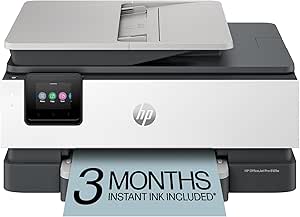 | Best for Fast, Reliable Home Office Printing with Automatic Duplex | Print Speed: up to 20 ppm black, 10 ppm color | Automatic Duplex Printing: Yes | Input Capacity: 225 sheets | VIEW ON AMAZON | See Our Full Breakdown |
| HP OfficeJet Pro 9125 Wireless All-in-One Color Inkjet Printer |  | Best Overall for Versatile Home Office Use | Print Speed (Black): 22 ppm | Print Speed (Color): 18 ppm | Input Tray Capacity: 250 sheets | VIEW ON AMAZON | See Our Full Breakdown |
| HP DeskJet 2955 Wireless All-in-One Color Inkjet Printer |  | Best Budget-Friendly Choice for Basic Home Printing | Input Tray Capacity: 60 sheets | Print Speed: Up to 7.5 ppm black, 5.5 ppm color | Connectivity: Wireless, mobile printing | VIEW ON AMAZON | See Our Full Breakdown |
| HP OfficeJet Pro 8135e Wireless All-in-One Color Inkjet Printer | 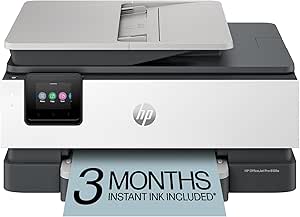 | Best for Fast, High-Volume Home Office Printing | Print Speed: Up to 10 ppm color, 20 ppm black | Input Tray Capacity: 225 sheets | Touchscreen: 2.7-inch color touchscreen | VIEW ON AMAZON | See Our Full Breakdown |
| HP OfficeJet Pro 8125 Wireless All-in-One Color Inkjet Printer | 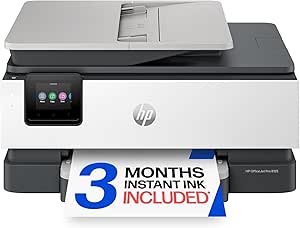 | Best for Balanced Speed and Versatility at Home | Print Speed: 20 ppm black, 10 ppm color | Input Tray Capacity: 225 sheets | Touchscreen: 2.7-inch color touchscreen | VIEW ON AMAZON | See Our Full Breakdown |
| hp printer for home office | Connectivity | Print Speed | Input Tray Capacity | Touchscreen |
|---|---|---|---|---|
| HP OfficeJet Pro 8135 Wireless | Dual-band Wi-Fi, HP app | up to 20 ppm black, 10 ppm color | 225 sheets | 2.7-inch color touchscreen |
| HP OfficeJet Pro 9135 Wireless | Dual-band Wi-Fi, HP app | 25 ppm black, 20 ppm color | — | 4.3-inch color touchscreen |
| HP Envy 6555e Wireless All-in- | Wireless dual-band Wi-Fi | 7 ppm color, 10 ppm black | 100 sheets | 2.4 inches |
| HP Envy 6155 Wireless All-in-O | Wireless dual-band Wi-Fi | 10 ppm black, 7 ppm color | 100 sheets | 2.4 inches |
| HP OfficeJet Pro 8125e Wireles | Dual-band Wi-Fi | up to 20 ppm black, 10 ppm color | — | — |
| HP OfficeJet Pro 9125 Wireless | Dual-band Wi-Fi | — | 250 sheets | 2.7-inch color touchscreen |
| HP DeskJet 2955 Wireless All-i | Wireless, mobile printing | Up to 7.5 ppm black, 5.5 ppm color | 60 sheets | — |
| HP OfficeJet Pro 8135e Wireles | Dual-band Wi-Fi | Up to 10 ppm color, 20 ppm black | 225 sheets | 2.7-inch color touchscreen |
| HP OfficeJet Pro 8125 Wireless | Dual-band Wi-Fi | 20 ppm black, 10 ppm color | 225 sheets | 2.7-inch color touchscreen |
More Details on Our Top Picks
HP OfficeJet Pro 8135 Wireless All-in-One Color Inkjet Printer
The HP OfficeJet Pro 8135 stands out for its balanced combination of speed, all-in-one functionality, and user-friendly interface, making it a strong contender for daily home office tasks. With a print speed of up to 20 ppm in black and 10 ppm in color, it handles medium-volume workloads efficiently. Unlike the HP OfficeJet Pro 9125, which is slightly faster but lacks automatic document feeder features, the 8135 offers comprehensive copying, scanning, faxing, and duplex printing in a single device. Its 2.7-inch touchscreen simplifies operation, while wireless connectivity ensures flexibility. The tradeoff for this versatility is reliance on original HP cartridges with chips, and firmware updates may restrict third-party supplies. It’s best suited for users who need a reliable, all-in-one printer without sacrificing speed or ease of use.
Pros:- Fast color and black printing speeds
- Intuitive 2.7-inch touchscreen interface
- Reliable wireless connectivity with dual-band Wi-Fi
- Supports automatic duplex printing and auto document feeder
Cons:- Requires original HP cartridges with chips, limiting third-party options
- Firmware updates may restrict third-party cartridges
- Price not specified, potentially higher for budget-conscious buyers
Best for: Home office users who need versatile printing, scanning, and faxing with quick turnaround times.
Not ideal for: Heavy-volume print environments or users seeking strictly budget-friendly options, due to higher cartridge and upfront costs.
- Print Speed:up to 20 ppm black, 10 ppm color
- Input Tray Capacity:225 sheets
- Touchscreen:2.7-inch color touchscreen
- Connectivity:Dual-band Wi-Fi, HP app
- Included Trial:3 months of Instant Ink
- Additional Features:Auto duplex printing, auto document feeder
Our verdict“This printer is ideal for home office users needing a reliable, feature-rich all-in-one with decent speed and ease of use.”
HP OfficeJet Pro 9135 Wireless All-in-One Color Inkjet Printer
The HP OfficeJet Pro 9135 offers higher print speeds and larger input capacity compared to the 8135, making it well-suited for busy home offices with substantial printing needs. Its 25 ppm black and 20 ppm color speeds outperform the 8135, especially for larger jobs. The 4.3-inch touchscreen provides a more detailed interface, and its dual 250-sheet input trays reduce refilling frequency. Security features like HP Wolf Pro Security add peace of mind for sensitive documents. Compared with the Envy series, which is geared more toward casual use, the 9135 emphasizes professional-grade performance and larger volume handling. The main tradeoffs are its reliance on original cartridges with HP chips and a higher cost for advanced features, which could be restrictive for casual users or those with tight budgets.
Pros:- Fast print speeds suitable for busy environments
- Large input capacity with two 250-sheet trays
- Enhanced security features with HP Wolf Pro Security
- Sustainable design with over 40% recycled plastic
Cons:- Relies on original HP cartridges with chips, limiting third-party options
- Higher price point may deter budget buyers
- Firmware updates may restrict third-party cartridges
Best for: Home office professionals handling large print volumes and requiring advanced security features.
Not ideal for: Casual users or those with infrequent printing needs, due to its higher initial cost and complexity.
- Print Speed:25 ppm black, 20 ppm color
- Input Trays:Two 250-sheet trays
- Touchscreen:4.3-inch color touchscreen
- Connectivity:Dual-band Wi-Fi, HP app
- Security:HP Wolf Pro Security
- Included Trial:3 months of Instant Ink
Our verdict“This model is best for home offices with high-volume printing needs and a focus on security and durability.”
HP Envy 6555e Wireless All-in-One Color Inkjet Printer
The HP Envy 6555e is tailored for users who prioritize photo printing and casual document tasks. Its 2.4-inch touchscreen is simple to navigate, and wireless connectivity allows printing from mobile devices. Compared with the OfficeJet Pro models, the Envy series offers slower print speeds—7 ppm for color and 10 ppm black—making it less suitable for high-volume tasks but perfect for everyday printing and photo printing at home. The inclusion of a 3-month Instant Ink trial helps control ink costs, but after that, cartridges with HP chips or circuitry will be necessary, limiting third-party options. It’s best for users who print low to moderate volumes and want a straightforward, stylish device for personal or light professional use.
Pros:- Compact and stylish design
- Wireless printing and mobile device compatibility
- Includes 3-month Instant Ink trial
- Easy-to-use touchscreen interface
Cons:- Slow print speeds limit efficiency for larger jobs
- Requires original HP cartridges with chips, restricting third-party options
- Limited input capacity (100 sheets)
Best for: Home users who mainly print photos and light documents with occasional scanning and copying.
Not ideal for: High-volume or fast-paced home offices, due to its slower speeds and limited input capacity.
- Print Speed:7 ppm color, 10 ppm black
- Auto 2-sided Printing:Yes
- Auto Document Feeder:35 sheets
- Input Tray Capacity:100 sheets
- Touchscreen:2.4 inches
- Connectivity:Wireless dual-band Wi-Fi
Our verdict“This printer works best for casual users seeking photo-quality printing and simple operation at home.”
HP Envy 6155 Wireless All-in-One Color Inkjet Printer
The HP Envy 6155 offers a straightforward, budget-conscious solution for home printing needs. Its 2.4-inch touchscreen makes setup and operation simple, while wireless connectivity enables printing from various devices. Compared with the 6555e, the 6155 has slower speeds—10 ppm black and 7 ppm color—making it less suitable for frequent, high-volume tasks but ideal for occasional printing. The 3-month Instant Ink trial helps keep ink costs manageable, especially with its eco-friendly content made from 60% recycled plastic. However, like other HP models, it depends on original cartridges with chips, limiting third-party options. This pick suits households that print sporadically and want a low-cost, reliable device for everyday tasks.
Pros:- Affordable price point
- Simple touchscreen interface
- Wireless connectivity with mobile compatibility
- Includes 3-month Instant Ink trial
Cons:- Slower print speeds limit efficiency for frequent use
- Requires original HP cartridges with chips, restricting third-party options
- Limited to basic home printing functions
Best for: Casual home users with light printing needs and a focus on affordability.
Not ideal for: High-volume or professional-quality printing, due to slower speeds and limited input capacity.
- Print Speed:10 ppm black, 7 ppm color
- Input Tray Capacity:100 sheets
- Touchscreen:2.4 inches
- Connectivity:Wireless dual-band Wi-Fi
- Included Trial:3 months Instant Ink
- Sustainable Content:Made with 60% recycled plastic
Our verdict“This model is well-suited for households that need an affordable, easy-to-use printer for light, occasional printing tasks.”
HP OfficeJet Pro 8125e Wireless All-in-One Color Inkjet Printer
The HP OfficeJet Pro 8125e combines impressive print speeds with automatic duplexing and a substantial paper capacity, making it a smart choice for busy home offices. Its black speed of up to 20 ppm and color at 10 ppm are comparable to the 8135 but with the added benefit of automatic duplex printing, saving time on double-sided jobs. Its 225-sheet input tray reduces refill interruptions, unlike the Envy models with smaller trays. While it shares the reliance on HP cartridges with chips, its overall faster speed and reliable Wi-Fi make it more suitable for frequent, professional-like use. The need for a subscription after the free trial can be a downside for budget-conscious users, but for those prioritizing speed and volume, this printer offers strong value.
Pros:- Fast print speeds for color and black
- Automatic duplex printing for efficiency
- Large 225-sheet input tray reduces refills
- Wireless connectivity with dual-band Wi-Fi
Cons:- Requires subscription after the free trial period
- Potentially higher ongoing ink costs
- Limited to home office use, less ideal for light or casual printing
Best for: Home office users who print frequently and need automatic duplexing and high-volume capacity.
Not ideal for: Casual or infrequent printers, as ongoing ink costs and subscription requirements may not fit casual budgets.
- Print Speed:up to 20 ppm black, 10 ppm color
- Automatic Duplex Printing:Yes
- Input Capacity:225 sheets
- Connectivity:Dual-band Wi-Fi
- Includes:3-month Instant Ink trial
- Additional Features:Auto document feeder
Our verdict“This printer is ideal for home offices needing fast, reliable, high-capacity printing with minimal interruptions.”
HP OfficeJet Pro 9125 Wireless All-in-One Color Inkjet Printer
The HP OfficeJet Pro 9125 stands out for its combination of fast color printing, all-in-one capabilities, and security features, making it a strong choice for busy home offices. Compared with the HP OfficeJet Pro 8135e, the 9125 offers slightly faster print speeds and a larger touchscreen, which can streamline workflow. However, it relies on original HP cartridges with chips, potentially increasing ongoing costs. Its dual-band Wi-Fi ensures reliable wireless connectivity, and the 3-month Instant Ink trial adds value. This model’s versatility suits users who need to print, scan, copy, and fax frequently without sacrificing speed or security, but it may be less ideal for those seeking a budget-friendly, simple printer.
Pros:- Fast color printing and comprehensive all-in-one functions
- Intuitive 2.7-inch touchscreen simplifies operation
- Reliable dual-band Wi-Fi ensures seamless wireless setup
- Includes a 3-month Instant Ink trial for cost savings
Cons:- Requires original HP cartridges with chips, which can be costly
- Firmware updates may necessitate updates or restrictions on third-party cartridges
- Higher initial price compared to basic models
Best for: Small business owners or remote workers who need a reliable, secure all-in-one printer with fast color output
Not ideal for: Casual users with low-volume printing needs, as the higher initial cost and cartridge requirements could be overkill
- Print Speed (Black):22 ppm
- Print Speed (Color):18 ppm
- Input Tray Capacity:250 sheets
- Touchscreen:2.7-inch color touchscreen
- Connectivity:Dual-band Wi-Fi
- Security:HP Wolf Pro Security
Our verdict“This printer is ideal for users who prioritize speed, security, and versatile features in a home office environment.”
HP DeskJet 2955 Wireless All-in-One Color Inkjet Printer
The HP DeskJet 2955 offers a straightforward, affordable solution for casual home users who need color printing, copying, and scanning. Its compact design and use of recycled plastics make it eco-friendly, but compared with the OfficeJet Pro 8135e, it sacrifices speed and advanced features. With a modest input tray capacity of 60 sheets and slower print speeds, it’s suitable for light, infrequent tasks. The inclusion of a 3-month Instant Ink trial adds value, yet ongoing ink costs can add up for frequent printers. This model is well-suited for families or students with basic needs, but not for high-volume or professional use.
Pros:- Very affordable and easy to operate
- Eco-friendly design with high recycled plastic content
- Wireless and mobile printing capabilities
Cons:- Limited to light, infrequent printing due to slow speeds
- Small input tray capacity restricts continuous printing
- Additional costs for ink after the trial period
Best for: Families or students needing affordable, occasional color printing and scanning
Not ideal for: Users with high-volume printing demands or requiring fast turnaround times, as its slow speeds limit productivity
- Input Tray Capacity:60 sheets
- Print Speed:Up to 7.5 ppm black, 5.5 ppm color
- Connectivity:Wireless, mobile printing
- Included Trial:3 months of Instant Ink
- Energy Certification:ENERGY STAR, EPEAT
- Recycled Content:At least 70% recycled plastics
Our verdict“This printer makes the most sense for casual users prioritizing low initial cost and basic functionality over speed and volume.”
HP OfficeJet Pro 8135e Wireless All-in-One Color Inkjet Printer
The HP OfficeJet Pro 8135e makes a compelling case for those who need quick, efficient printing with a large input tray of 225 sheets. Its 10 ppm color and 20 ppm black speeds outperform many peers, including the OfficeJet Pro 9125, which is slightly slower. The large touchscreen enhances ease of use, but it requires cartridges with specific chips, restricting third-party options. The 3-month Instant Ink trial adds value, yet some users may find the ongoing subscription costs and firmware updates restrictive. This model suits busy home offices that demand speed and volume, but its higher cost and cartridge restrictions could deter casual users.
Pros:- Very fast print speeds for both color and black
- Large 225-sheet input tray minimizes refilling
- Intuitive large touchscreen simplifies operation
- Includes 3-month Instant Ink trial for savings
Cons:- Requires HP cartridges with specific chips, limiting third-party options
- Firmware updates may restrict non-HP cartridges
- Price point might be high for light use
Best for: Home office users with high print volume and need for speed, especially those who print color frequently
Not ideal for: Casual or infrequent printers who won’t utilize its high-speed capabilities or larger input tray
- Print Speed:Up to 10 ppm color, 20 ppm black
- Input Tray Capacity:225 sheets
- Touchscreen:2.7-inch color touchscreen
- Connectivity:Dual-band Wi-Fi
- Included Trial:3 months of Instant Ink
- Recycled Content:45% recycled plastic
Our verdict“Ideal for demanding home offices that need rapid, high-volume color printing with minimal intervention.”
HP OfficeJet Pro 8125 Wireless All-in-One Color Inkjet Printer
The HP OfficeJet Pro 8125 offers a well-rounded solution for home offices needing fast color printing and versatile features, including a 2.7-inch touchscreen and an automatic document feeder. Compared to the 8135e, the 8125 is slightly less fast but still handles high-volume tasks effectively. Its 225-sheet input tray supports large print jobs, and the inclusion of a 3-month Instant Ink trial provides ongoing savings. However, it requires cartridges with specific chips, which can limit third-party options and complicate refills. This model balances speed and flexibility, making it suitable for users who want a reliable, all-in-one printer without the premium price of the 8135e.
Pros:- Fast color printing and versatile functionality
- User-friendly 2.7-inch touchscreen and auto document feeder
- Large input capacity supports high-volume printing
- Includes 3-month Instant Ink trial for savings
Cons:- Requires specific HP cartridges with chips, limiting third-party options
- Firmware updates may restrict non-HP cartridges
- Price not specified in the description, potentially high
Best for: Home professionals or small teams needing reliable, fast color printing with document management features
Not ideal for: Casual users with infrequent printing needs or those seeking a less feature-rich, more affordable option
- Print Speed:20 ppm black, 10 ppm color
- Input Tray Capacity:225 sheets
- Touchscreen:2.7-inch color touchscreen
- Connectivity:Dual-band Wi-Fi
- Features:Print, scan, copy, duplex, ADF
- Recycled Content:Made with over 45% recycled plastic
Our verdict“This printer strikes a balance between speed and feature set, perfect for busy home offices needing dependable performance.”

How We Picked
Our evaluation focused on performance, usability, build quality, and value for a home office environment. We prioritized printers that offer reliable wireless connectivity, cost-effective ink or toner usage, and versatile features like duplex printing and scanning. Models were ranked based on their ability to balance high performance with affordability, considering user reviews and expert insights. The goal was to identify printers that meet the needs of casual users, small business owners, and those seeking a straightforward setup without sacrificing print quality or speed.| hp printer for home office | Connectivity |
|---|---|
| HP OfficeJet Pro 8135 Wireless | Dual-band Wi-Fi, HP app |
| HP OfficeJet Pro 9135 Wireless | Dual-band Wi-Fi, HP app |
| HP Envy 6555e Wireless All-in- | Wireless dual-band Wi-Fi |
| HP Envy 6155 Wireless All-in-O | Wireless dual-band Wi-Fi |
| HP OfficeJet Pro 8125e Wireles | Dual-band Wi-Fi |
| HP OfficeJet Pro 9125 Wireless | Dual-band Wi-Fi |
| HP DeskJet 2955 Wireless All-i | Wireless, mobile printing |
| HP OfficeJet Pro 8135e Wireles | Dual-band Wi-Fi |
| HP OfficeJet Pro 8125 Wireless | Dual-band Wi-Fi |
Factors to Consider When Choosing Hp Printer For Home Office
Choosing the right HP printer for your home office requires considering several key factors. Beyond just print quality, it’s important to think about ongoing costs, ease of use, connectivity options, and the types of documents you’ll print most often. Making a thoughtful decision here can save you money and frustration over time, especially if you print frequently or have specific needs like scanning or photo printing.Print Volume and Cost Efficiency
Consider how much you’ll print each month. High-volume printers typically have larger paper capacities and more efficient ink or toner use, which lowers running costs. If you print infrequently, a smaller, less expensive model might suffice, but beware of ink costs that can add up quickly in cheaper models. Always check the cost per page to understand the long-term expenses associated with each printer.Connectivity and Smart Features
Wireless connectivity is a must-have for most home offices, allowing you to print from multiple devices seamlessly. Look for models with features like Wi-Fi Direct, Bluetooth, or mobile app integration. Smart features such as voice control or cloud printing can enhance convenience, but add complexity and cost, so assess whether you actually need these extras for your workflow.Print and Scan Quality
For document-heavy tasks, high-quality printing and reliable scanning matter. Inkjet models excel at color and photo printing but often have higher running costs, while laser printers provide sharper text and faster speeds. If scanning quality is a priority, check the resolution and whether the scanner supports duplex or automatic document feeders, which save time.Ease of Use and Maintenance
A straightforward setup process and intuitive controls are essential, especially for users less comfortable with tech. Consider models with user-friendly interfaces, clear instructions, and minimal maintenance requirements. Also, factor in the availability and cost of replacement ink or toner, as these ongoing expenses can influence overall satisfaction and long-term value.Size and Placement
Home offices vary in space, so measure your area before selecting a printer. Compact models save space but may sacrifice capacity or features, while larger all-in-one printers offer more functions but require more room. Think about placement near power outlets and network access points to ensure smooth setup and operation.Frequently Asked Questions
How do I choose between inkjet and laser printers for my home office?
Inkjet printers generally provide better color quality and are better suited for photo printing or occasional use, but they tend to have higher running costs. Laser printers, on the other hand, excel at fast, high-volume black-and-white printing and often have lower cost per page, making them more economical for frequent document printing. Your choice depends on your typical print volume, color needs, and budget for ongoing supplies.Are wireless printers more prone to connectivity issues?
While wireless printers offer great convenience, they can sometimes face connectivity hiccups, especially if your Wi-Fi network is unstable or crowded. To minimize issues, ensure your router is capable of handling multiple devices smoothly, and keep the printer firmware updated. For critical tasks, a wired connection or a dedicated network setup can provide more reliable performance, but most modern wireless printers are quite dependable when configured correctly.Is it worth paying extra for a model with automatic duplex printing?
Automatic duplex printing can significantly save time and paper by enabling double-sided printing with minimal effort. If you frequently print multi-page documents, investing in this feature offers convenience and reduces ongoing paper costs. For occasional or single-page printing, it might not justify the extra expense, so consider your typical usage patterns carefully.How important is the scanner quality on an all-in-one printer?
Scanner quality directly impacts the clarity and usefulness of digital copies, especially if you scan documents regularly or need high-resolution images. Look for models with at least 1200 dpi resolution if detailed scans are necessary. Features like automatic document feeders and duplex scanning further enhance productivity, making the scanner more versatile and less of a bottleneck in your workflow.Can I use third-party ink or toner cartridges with these HP printers?
Many HP printers are compatible with third-party cartridges, which can save money. However, using non-HP supplies risks voiding your warranty or experiencing print quality issues. Also, some models have firmware updates that block third-party cartridges, so check the manufacturer’s policies and reviews before switching. For best results and to protect your device, sticking with original HP supplies is often recommended.Conclusion
For most home office users, the HP OfficeJet Pro 9135 offers a balanced mix of speed, quality, and versatility, making it the best overall pick. Budget-conscious buyers should consider the HP DeskJet 2955, which provides decent performance at a lower price point. If you prefer a premium experience with advanced features, the HP Envy 6555e is worth the investment. Beginners or those with limited space may find the HP OfficeJet 8125 easier to set up and use, while small business owners needing high-volume capacity should look at the higher-tier OfficeJet Pro models. Your ideal choice depends on your specific printing needs, budget, and space constraints.Fall Picks
fall essentials
As an affiliate, we earn on qualifying purchases.